

As virtual players are constantly on the lookout for more convenient methods to fund their gaming accounts online, more fintech solutions are entering the iGaming market. With more Android device users resorting to Google Pay, also known as GPay, for their purchases, the service has slowly been integrated into the online casino sector as well.
| Google Pay Summary | |
|---|---|
| Available in | Over 70 countries |
| Website | www.pay.google.com |
| Connecting bank card/account to Google Pay | Free |
| Withdrawal balance from Google Pay to your bank card/account | 1.5% to debit cards |
| Pay to online merchants | Free |
| Available for deposit | Yes |
| Available for withdrawal | No |
| Usual deposit time in online casino | Instant |
| Usual withdrawal time from online casino | N/A |
| Live chat | No |
| Telephone support | No |
| E-mail support | in-app support |
More virtual casinos allow their patrons to make deposits with Google Pay, resulting in the payment solution becoming a popular method among many casino enthusiasts. The Google Pay app is currently supported by all devices running Android 5.0 or newer, as well as iOS 12.0 or later. This makes the service available to numerous users who have decided to use Google Pay for their online casino deposits.
Like other payment apps, Google Pay enables you to save your credit or debit card information and initiate quick yet very secure payments online or in person. Most of the newest virtual casinos are adding Google Pay to their lists of supported deposit options, and many major casino operators also include Google Pay in their deposit methods.
Best Google Pay Online Casinos
-
Bizzo Casino
Min Deposit$10Max Withdrawal- $4,000 per day
- $16,000 per week
- $50,000 per month
Deposit Methods



























 Withdrawal Methods
 Withdrawal TimeUp to 7 days
- Players can contact customer support via live chat
- Live casino games are available
- SSL encryption
- The casino is compatible with mobile devices
- Bizzo Casino offers an array of games
- Quick verification process
Bizzo Casino offers an excellent range of casino games to its users. If you prefer live dealer table games, Bizzo Casino’s live casino section lets you enjoy many thrilling titles from providers such as Evolution Gaming and Pragmatic Play.
Slot lovers are also well catered to at Bizzo Casino. The site boasts hundreds of exciting titles, including Gonzo’s Gold by NetEnt, Dragon’s Tavern Bonus Buy by Evoplay Entertainment, and Pragmatic Play’s Wolf Gold.
If you decide that Bizzo Casino is right for you, creating an account and making a deposit is straightforward. The casino accepts a wide range of banking solutions, including bank cards such as Visa and Mastercard, cryptocurrencies like Bitcoin, Ethereum, and Litecoin, and e-wallets such as Skrill, Neteller, and Google Pay.
Knowing the casino has your back when an issue arises can ease a lot of stress. Bizzo Casino’s customer support team is available 24/7, and you can reach a representative via email or live chat.
-
High Country Casino
Min Deposit- Payment Services (incl. Google Pay) - $25
- Bank Cards - $25
- Cryptocurrencies - $5
Max Withdrawal- Bank transfer- $1,250
- Cryptocurrencies - $5,000
- Check - between $399.99 and $2,500
Deposit Methods Withdrawal Methods
 Withdrawal TimeApproximately 2 weeks
- 24/7 customer support
- SSL encryption
- Wide variety of slot games
- Players can use modern deposit methods, including Google Pay and cryptocurrencies
- The website’s menus are easy to navigate
- Realtime Gaming is the casino’s software provider
Online slot fans will find High Country Casino to be an excellent choice. The casino’s catalog is packed with titles from Realtime Gaming, including popular slots such as Aztec’s Millions, Desert Raider, Jackpot Cleopatra’s Gold, Aladdin’s Wishes, and Coyote Cash. Although only one live dealer game is available, the table games section offers enough variety to satisfy fans of blackjack, video poker, and roulette.
High Country Casino’s website features a pleasant purple and yellow color palette and an overall modern design. The gaming section is well organized, making it easy for players to find their preferred titles. All games run directly on the site, so no additional software needs to be downloaded. The banking section is also easy to locate, and players can deposit through numerous payment methods, including Google Pay and bank cards such as Visa, Mastercard, Discover, and American Express. With the growing popularity of cryptocurrencies, High Country Casino also accepts Bitcoin, Litecoin, Tether, and Ethereum deposits.
-
Golden Tiger Casino
Min Deposit$10Max Withdrawal$4000 per weekDeposit Methods




 Withdrawal MethodsWithdrawal Time3 business days
- Regulated by reputable authorities
- Customer support is available around the clock
- Players will find numerous games to try at Golden Tiger Casino
- The slot games at Golden Tiger Casino are provided by Microgaming
- Players can create an account quickly
- Good selection of banking solutions
The abundance of online casinos can make finding a reputable site difficult for the average gambling enthusiast. One of the best indicators of trustworthiness is licensing, and Golden Tiger Casino holds licenses from the Malta Gaming Authority and the United Kingdom’s Gambling Commission.
Microgaming powers Golden Tiger Casino’s game library, which includes slots, roulette, baccarat, blackjack, and sic bo. The slot section hosts the largest number of titles, with games like Wild Link Zeus, Atlantean Treasures Mega Moolah, and Immortal Romance Mega Moolah among the highlights. Players can also enjoy live dealer tables for baccarat, roulette, and more.
Golden Tiger Casino provides an impressive selection of deposit methods. Players can fund their accounts with Interac, Paysafecard, MuchBetter, and, of course, Google Pay, among others.
-
Casinochan
Min Deposit$15Max Withdrawal- e-Wallets - $4,000
- Bank Cards - between $4,000 and $6,000
- Prepaid vouchers - between $250 and $6,000
- Bank Transfer - $4,000
- Payment services - $4,000
- Bitcoin - 2 BTC
- Ethereum - 5 ETH
- Bitcoin Cash - 5 BCH
- Dogecoin - 700,000 DOGE
- Litecoin - 30 LTC
- Tether - 4000 USDT
Deposit Methods

 Withdrawal MethodsWithdrawal Time
- e-Wallets - Instant
- Bank Cards - between 1 and 3 days
- Prepaid Vouchers - Instant
- Bank Transfer - between 1 and 5 days
- Payment Services - Instant
- Cryptocurrencies - Instant
- Numerous withdrawal options
- Casinochan users can enable two-factor authentication
- The registration process is simple
- Games from more than 50 software developers
- The casino is available in multiple languages: English, French, German, Italian, and Czech
- Verification does not take long
Mobile gaming is at an all-time high, and this trend extends to gambling on smart devices. Players who choose Casinochan can enjoy their favorite casino games on desktop browsers as well as on mobile browsers. Its compatibility with mobile browsers means Casinochan is not limited by operating system, so users can access the site, log in, deposit, and play whether they use an Android smartphone or an iPhone.
A diverse lineup of slots and table games awaits those who give Casinochan a try. More than 60 software providers supply the platform with titles, including well-known names such as Evoplay Entertainment, Mancala Gaming, and MrSlotty. Available categories include slots, live dealer options, and traditional table games.
Casinochan has a solid reputation and strives to give players the best possible experience. Customer support is available around the clock, and you can contact a representative any day of the week.
-
Cherry Gold Casino
Min Deposit- All payment methods except Ethereum (Incl. Google Pay) - $25
- Ethereum - $100
Max Withdrawal$2000 per weekDeposit MethodsWithdrawal MethodsWithdrawal Time3-7 business days- 24/7 customer support
- The registration process is quick and easy
- Multiple banking solutions
- Classy web design
- Players can contact support via email, phone, or live chat
- Cherry Gold Casino is compatible with smartphones
Launched in 2004, Cherry Gold Casino delivers dozens of games from RealTime Gaming to online gambling enthusiasts. Players can enjoy titles such as Megasaur, Jackpot Cleopatra’s Gold, and Vegas Lux. The table games section features options like Baccarat, European Roulette, Match Play 21, and Texas Hold’em Bonus Poker, and live dealer games are also available.
Cherry Gold Casino prioritizes player safety, so the website is secure and all information is protected by Secure Socket Layer encryption. In addition, players can use the responsible gambling tools to set deposit limits, and self-exclusion is available when necessary.
The site sports an elegant red and gold design, and you can choose between a light or dark theme. Navigating the menus is simple, and the customer support page is easy to find. If help is needed, players can use the live chat function, call the support team, or send an email.
-
Casumo Casino
Min Deposit$10Max Withdrawal$50,000 per monthDeposit Methods Withdrawal MethodsWithdrawal Time
- All methods except bank transfer - Instant
- Bank transfer - up to 5 business days
- The casino’s app uses biometric authentication for logins
- Excellent game catalog
- Offers live casino games
- Sports betting is also available
- Good selection of withdrawal options
- Casumo Casino features titles from well-known developers such as Microgaming and Pragmatic Play
Based in Malta yet available worldwide, Casumo Casino boasts an impressive catalog of games. Numerous suppliers contribute to its library, including well-known developers like Pragmatic Play, Microgaming, Ezugi, and Play’n GO. Slots such as Starburst, Sahara Riches, and Wonder of Wager are just a few examples of what you can play, and live table games recreate the atmosphere of a brick-and-mortar casino.
Casumo Casino is also ideal for players who enjoy sports betting from time to time. The platform is snappy and reliable, offers plenty of sports markets, and provides competitive odds.
No matter what you play, the casino protects both your personal information and your account. A Secure Socket Layer protocol encrypts all sensitive data, and biometric authentication is available through Casumo’s smartphone app.
-
Slots Magic Casino
Min Deposit- e-Wallets (incl. Google Pay) - $10
- Bank Cards - $10
- Payment services - $10
- Prepaid Vouchers - $9.5
Max Withdrawal$5,000 per transactionDeposit Methods Withdrawal Methods

 Withdrawal Time
- e-Wallets - up to 24 hours
- Bank Cards - between 2 and 7 days
- Wire Transfer - between 2 and 7 days
- SSL encryption
- Games from more than 60 software providers
- Multiple withdrawal methods
- Excellent mobile layout
- The verification process does not take long
- Offers live dealer casino games
Slots Magic launched in 2014 and offers a wide range of games. The casino features titles from respected providers such as Quickspin, Microgaming, Rabcat, Pragmatic Play, Blueprint Gaming, Red Tiger, Play’n GO, and many others.
Slot fans are spoiled for choice and can spin Gonzo’s Quest, Sweet Bonanza, Fishin’ Frenzy Big Catch, Jurassic World Raptor Riches, Buffalo King Megaways, and many more. Players interested in other forms of entertainment will find excellent options in table games, live dealer titles, and game shows.
When creating an account, players can set daily, weekly, or monthly deposit limits, as well as loss limits. Deposits are possible via Trustly, PayPal, Google Pay, Paysafecard, and others, while withdrawals can be made through Neteller, Skrill, ecoPayz, and more.
Slots Magic’s credibility is reinforced by licenses from leading regulators: the Malta Gaming Authority, the United Kingdom Gambling Commission, and the Alcohol and Gaming Commission of Ontario.
-
Playamo Casino
Min Deposit$10Max Withdrawal- e-Wallets - between $3,000 and $4,000
- Bank Cards - $4,000
- Prepaid Vouchers - between $250 and $4,000
- Bank Transfer - $4,000
- Payment Services - between $500 and $4,000
- Bitcoin - 2 BTC
- Ethereum - 5 ETH
- Bitcoin Cash - 5 BCH
- Dogecoin - 700,000 DOGE
- Litecoin - 30 LTC
- Tether - 4000 USDT
Deposit Methods
 Withdrawal MethodsWithdrawal Time
- e-Wallets - Instant
- Bank Cards - between 1 and 3 days
- Prepaid Vouchers - Instant
- Bank Transfer - between 1 and 5 days
- Payment Services - Instant
- Cryptocurrencies - Instant
- Games from more than 60 software providers
- The website’s menus are well organized and easy to navigate
- Two-factor authentication
- Customer support is available around the clock
- Offers live dealer games
- SSL encryption
Players who love the atmosphere of brick-and-mortar casinos but cannot visit one in person will appreciate Playamo Casino’s extensive live dealer selection. Whether you prefer blackjack, roulette, baccarat, or poker, you will find a table quickly. The casino hosts streams from top providers such as Evolution Gaming and Lucky Streak, ensuring excellent video quality, intuitive menus, and a welcoming atmosphere.
Beyond live tables, Playamo offers a vast collection of slots. Highlights include Book of Champions Reloaded by Spinomenal, Valley of the Gods 2 by Yggdrasil Gaming, and Bamboo Grove by Platipus.
If you ever encounter an issue or have a question, Playamo Casino’s customer service team is ready to help. You can reach support via email or the live chat feature, and assistance is available 24/7, every day of the week.
-
Sun Palace Casino
Min Deposit- Payment services (incl. Google Pay) - $25
- Bank cards - $25
- Cryptocurrencies - $5
Max Withdrawal- Bank transfer - $1,250
- Cryptocurrencies - $5,000.00
- Check - between $399.99 and $2,500
Deposit MethodsWithdrawal Methods Withdrawal TimeApproximately 2 weeks
- Customer support available via live chat
- Dozens of casino games on offer
- Sun Palace Casino is compatible with mobile devices
- The customer service team is available 24/7
- The casino is secure
- Pleasant design
Sun Palace Casino’s entire catalog is powered by Real Time Gaming, a provider that has been active since the 1990s and is known for titles such as Cleopatra’s Gold, Gem Strike, Khrysos Gold, and Legend of Helios. All of these slots are available at Sun Palace Casino, but slot games are only part of the offering. Suit ’Em Up Blackjack, Caribbean Stud Poker, and Tri Card Poker are just a few of the options found in the table games section.
You may download the casino’s software to your computer, but it is not required. Sun Palace Casino offers instant play, allowing you to enjoy all of your favorite games directly in your browser.
Problems are rare during gaming sessions at Sun Palace Casino, yet it is reassuring to know help is available. The casino provides 24/7 customer service, so you can contact support at any time via live chat or email.









Google Pay Registration Process
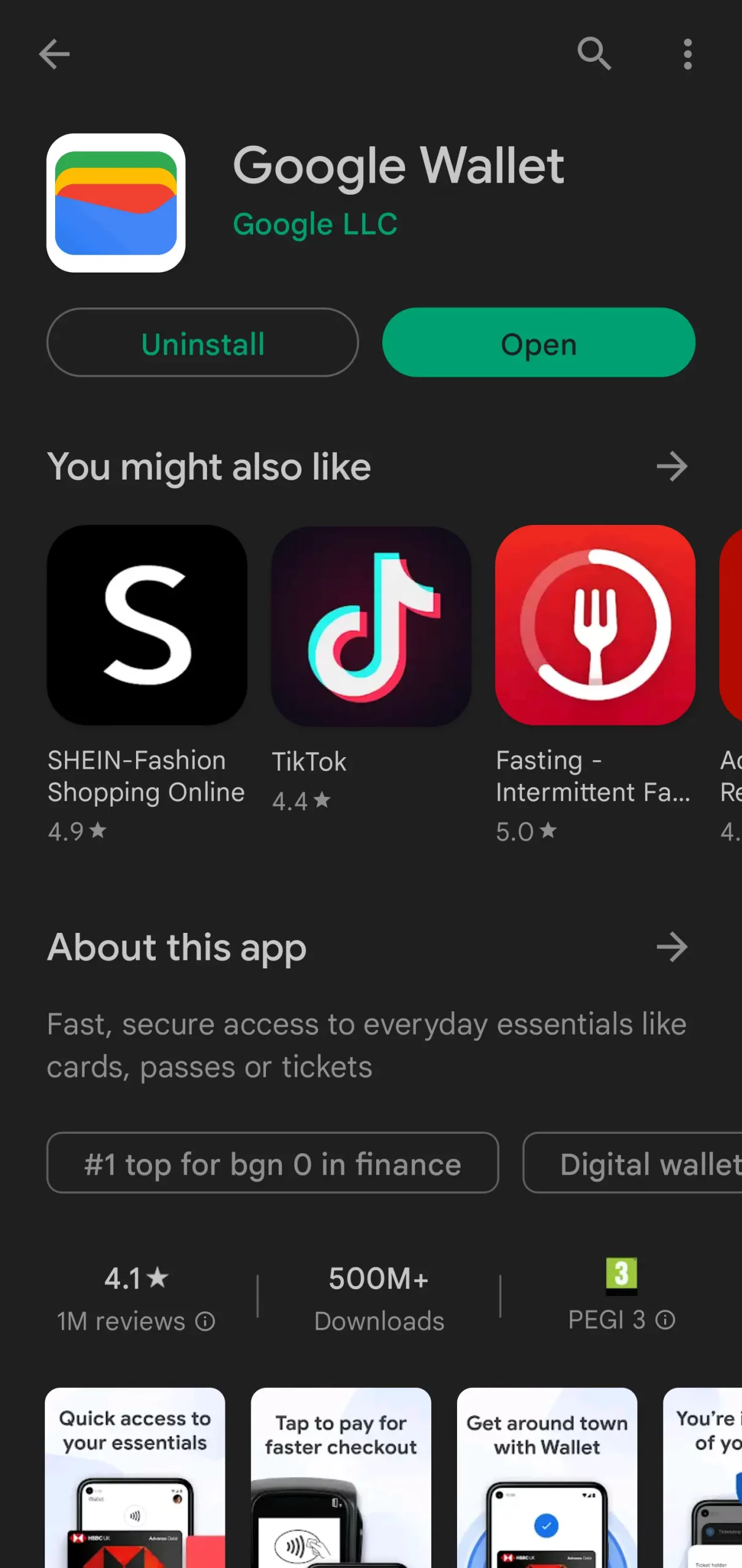
Google Pay is available through Google’s e-wallet application. The Google Wallet app itself can be installed on Android and iOS devices, although you do need to have a Google account if you wish to take advantage of what Google Wallet has to offer. The following steps will guide you through the setup process if you have a smartphone running Android.
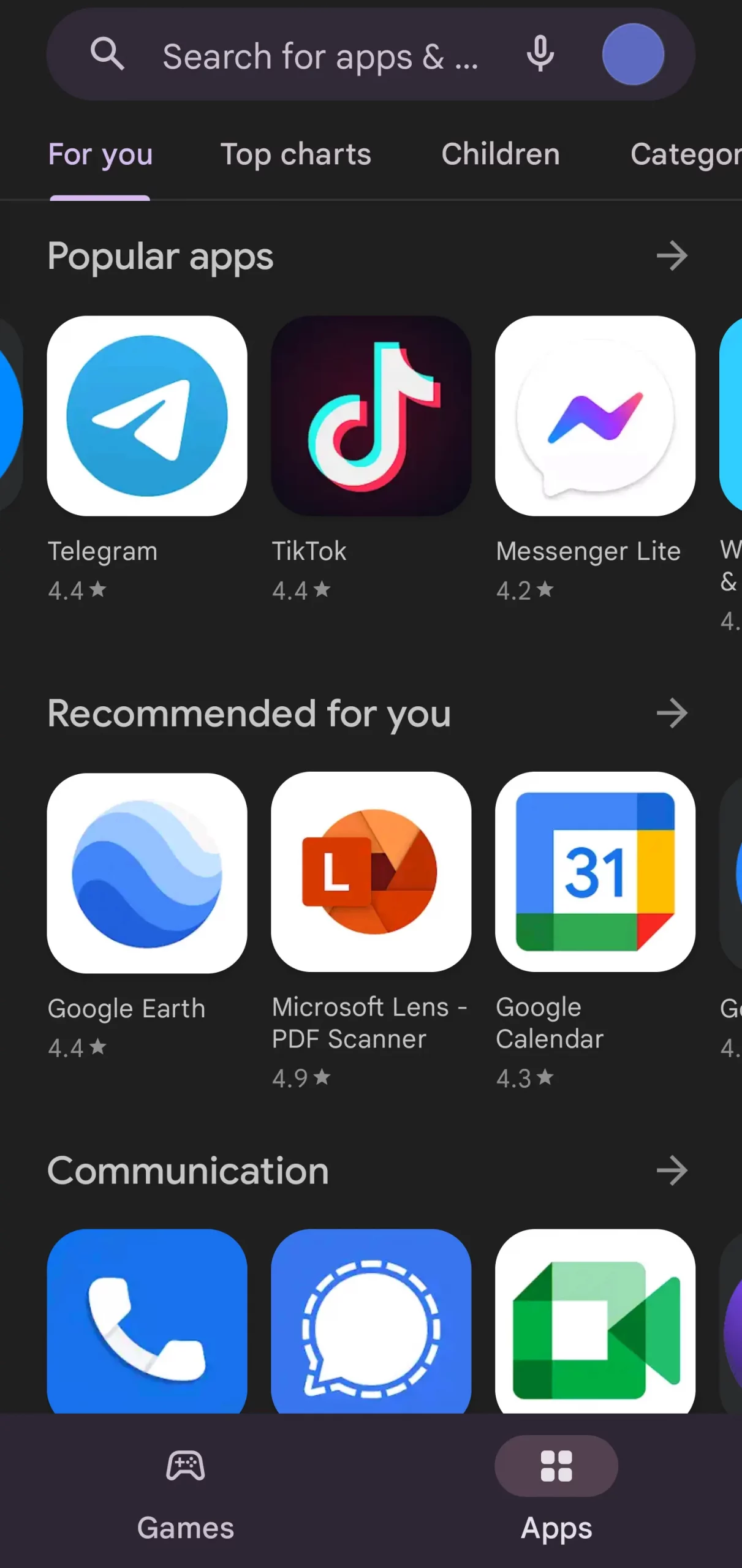
- If you already have a Google account, navigate to the Google Play Store and search for the Google Wallet app.
- Once you locate the app, tap Install to download the application to your Android device.
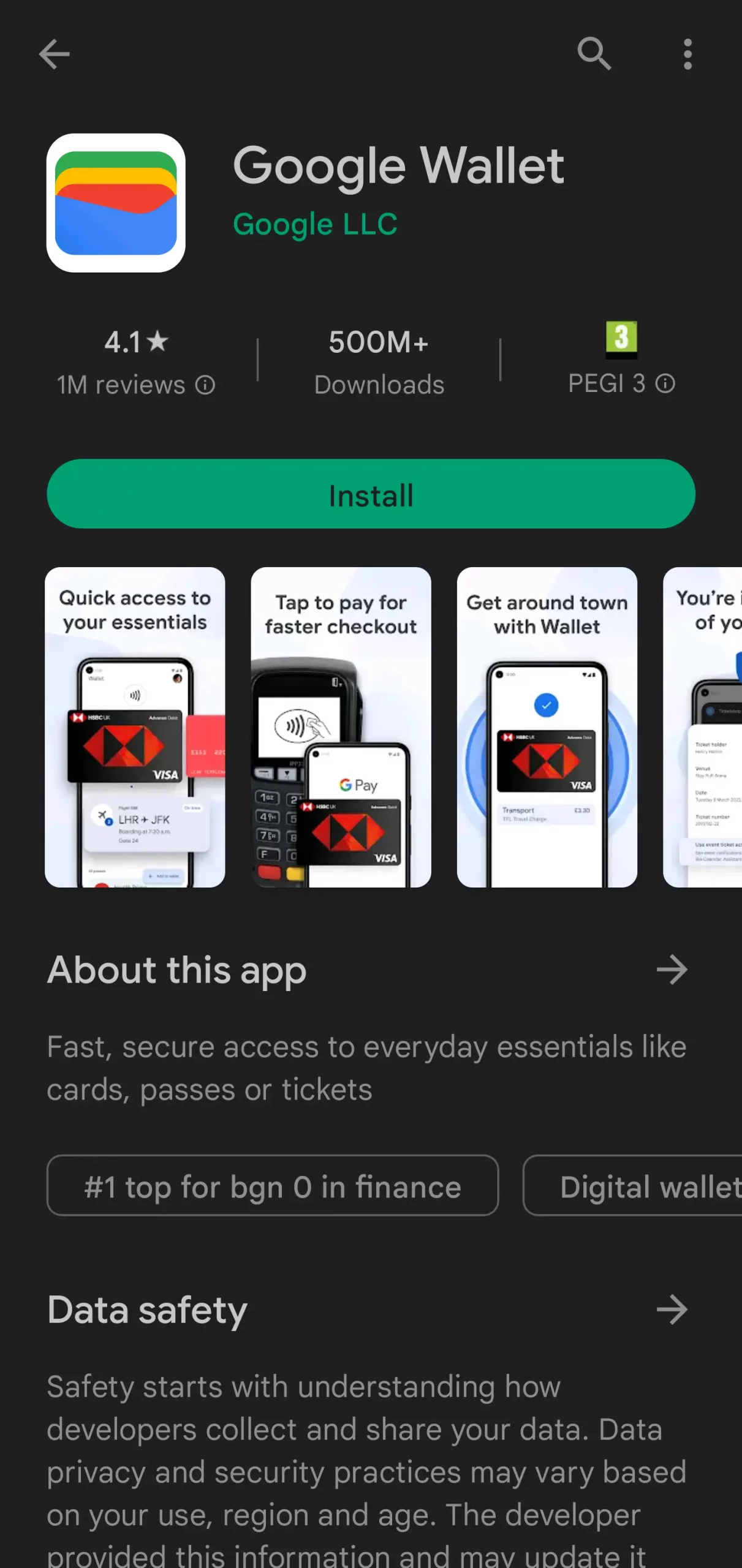
- When the installation is complete, open Google Wallet via the button in the store or by tapping the app icon in your app drawer.
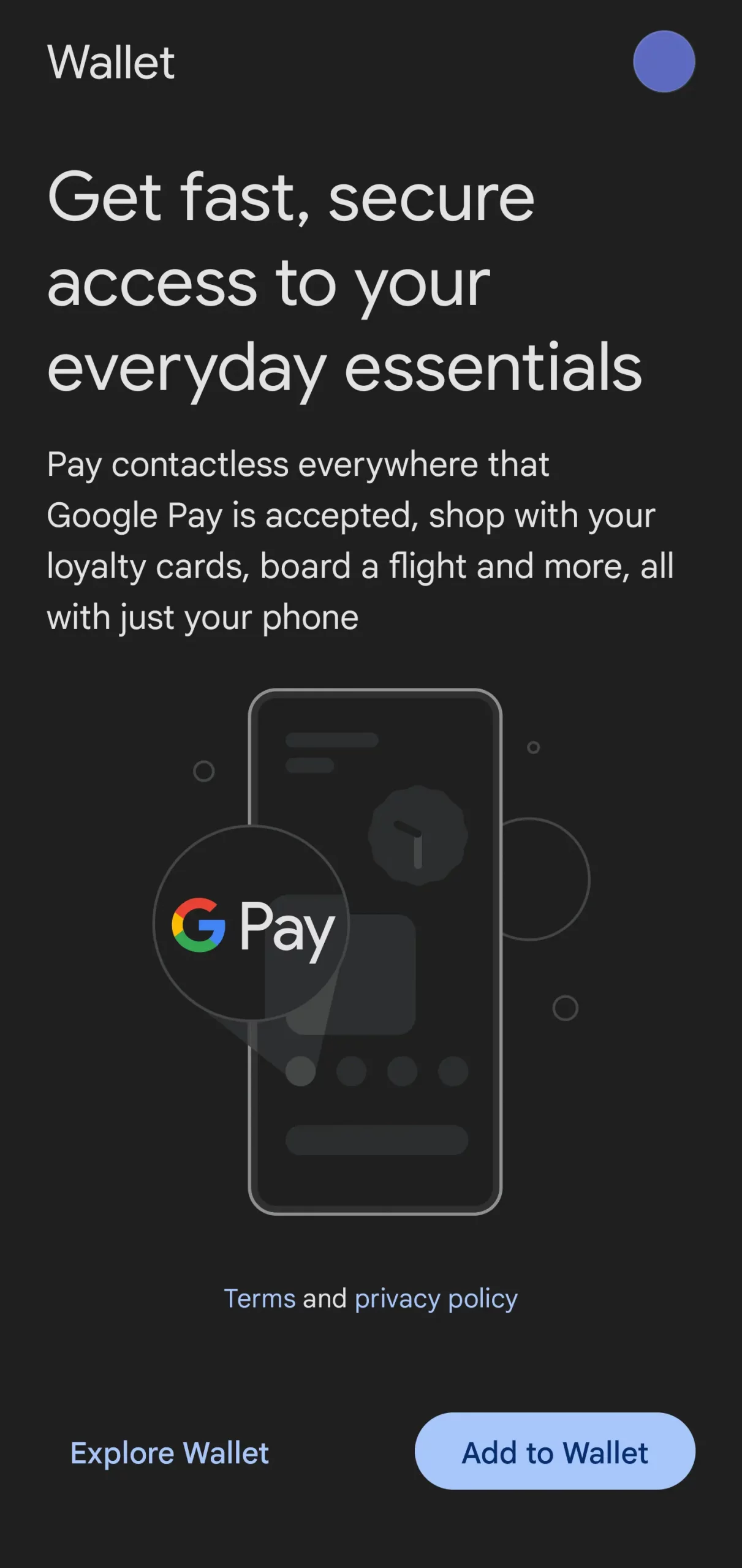
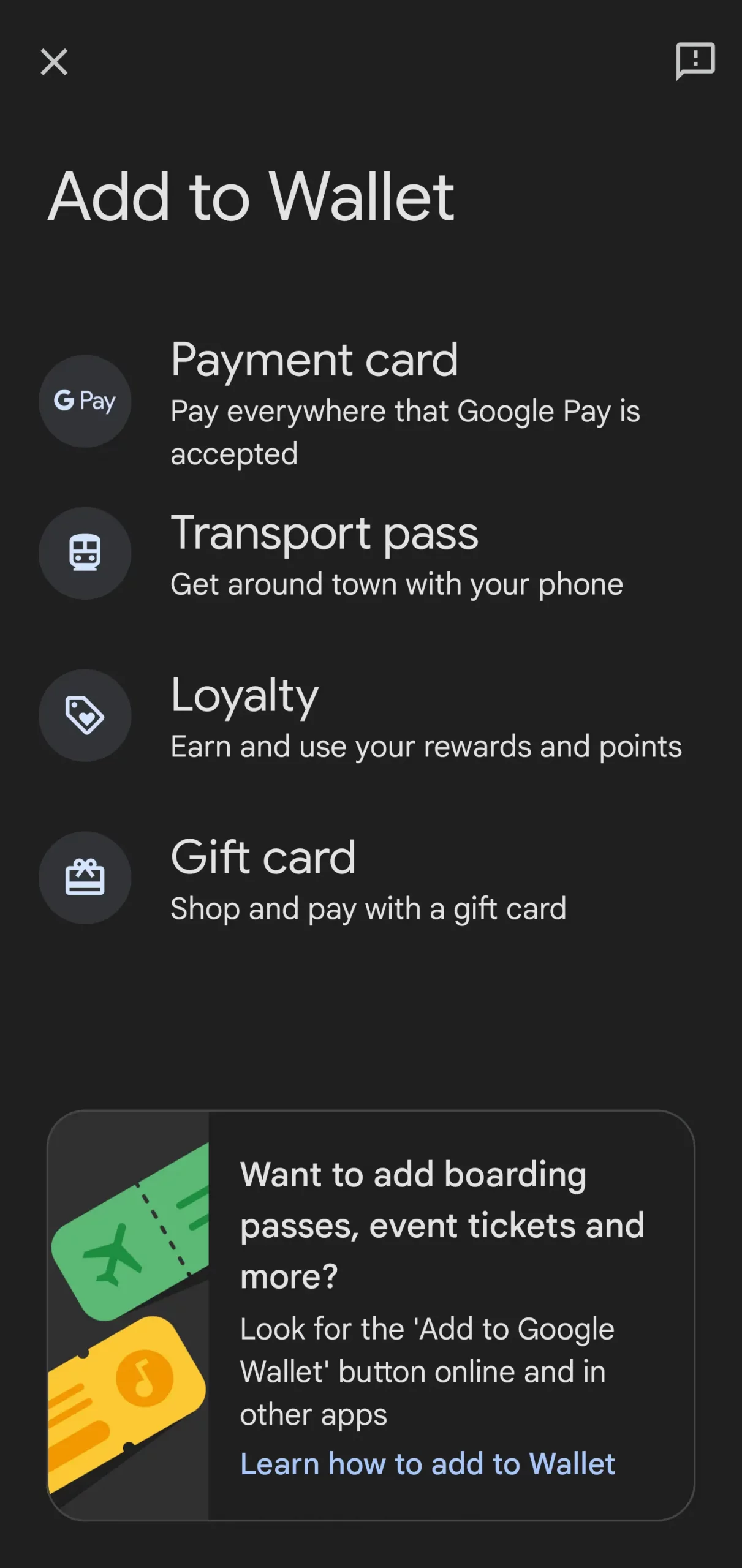
- Upon opening the app, tap the Add to Wallet button. You will be presented with several options when it comes to using your Google Wallet.
- To set up Google Pay, choose the Payment card option and input the required information manually or by taking a photo. Once this is done, all that remains is to accept the Terms and Conditions, and the process is complete.
That sums up all the steps necessary to set up Google Pay, and you are now free to use it on the web and at your preferred gambling websites. Crucially, you will not need to pay any setup or service costs, as Google Wallet and all its associated tools are free. Additionally, gaming enthusiasts should note that if they wish to use Google Pay on an iPhone, the process is fairly similar, except they need to download the app from the iOS App Store.
Players can rest assured that they can fund their casino accounts safely when they use Google Pay. The service encrypts your payment information, so transactions are very secure, and the fact that you do not need to share your card information with casinos directly is yet another advantage of Google Pay when it comes to security and privacy. Additionally, two-factor authentication is available, as are features like Find My Device and the ability to erase your data remotely if your phone is stolen.
How Google Pay Works
Using Google Pay for Gambling Transactions
 Coming across a virtual casino that supports Google Pay deposits is getting easier as more operators add this option to their payment solutions. Using the app for casino payments is extremely easy, enabling players to quickly fund their gaming accounts and start playing right away.
Before you proceed to make deposits with Google Pay, however, you will need to set up your Google Pay account. This takes only a couple of minutes and enables you to make payments via Google Pay immediately. To set up Google Pay, you will need a Google account, which most Android users already have because it is used to set up their smart devices. A Google account requires a Gmail email address, so if you already have one, you can go ahead and use it to set up your Google Pay profile.
The Google Pay app can be downloaded from the Google Play Store for Android devices and the Apple App Store for devices running iOS. When you open the app, you can follow the on-screen instructions to quickly set up your Google Pay account. This app works like other mobile wallets, allowing you to save your credit or debit card details and use Google Pay for your next online or in-person payment.
Once you have added your cards to your Google Pay wallet, you can use your smart device to verify your deposits in online casinos instead of resorting to card payments. The payment process itself is very simple: head to the deposit page of the online casino, enter the amount you would like to deposit, and choose Google Pay from the list of supported payment solutions. The next step is to select the card you would like to use and confirm the transaction via your smart device.
Once you confirm the deposit, the money should instantly appear in your gaming account. In addition to the speed of the transaction, you can be sure that depositing via Google Pay will not incur any surcharges.
Unfortunately, Google Pay is available only for deposits at online casinos. This means that when it comes to withdrawing your winnings, you will need to resort to an alternative payment method. That said, Google Pay offers a very convenient way to top up your casino account, adding another layer of protection to the payments. As players are not exposing any sensitive information during the depositing process, they can feel confident that both their banking details and their funds are properly protected.
| Google Pay Gambling Transactions | |
|---|---|
| Supported transactions | Deposits |
| Deposit pending time | Instant |
| Withdrawal pending time | N/A |
| Additional security | encryption, authentication |
Advantages and Disadvantages of Using Google Pay as a Payment Method
 We can confirm that Google Pay is a very convenient and secure way to make deposits into your online casino account. However, to help you decide whether this payment solution is right for you, we will present the strong points of Google Pay as well as the few shortcomings of this payment method.
Let us begin with the positives of using Google Pay for your online casino deposits. The method is extremely fast and easy to use. This will enable you to fund your gaming balance whenever you feel like it, allowing you to play your favorite casino games right away. The fact that payments are confirmed with just a few taps on the screen is extremely convenient, allowing players to stay on top of their casino deposits at any time of the day.
Many consider Google Pay a great alternative to Apple Pay, which is available exclusively to iOS users. While Google Pay is predominantly used by Android users, it is also available in the Apple Store, enabling iPhone and iPad users to use Google Pay for their online and offline purchases. Google Pay is also widely available across numerous countries, further expanding the number of casino players who can use the service for their online casino deposits.
Additional Advantages and Disadvantages of Google Pay
When players are funding their gaming accounts, in addition to the speed of transactions, the safety of their funds is also an important issue. While you are storing your cards in the e-wallet of Google Pay, you can be sure that your card details are properly protected, with payment information being encrypted and stored on highly secure servers. In addition, when you initiate a deposit via Google Pay at an online casino, you will not be asked to provide any type of sensitive information, adding another layer of protection to your payments.
Another great advantage of using Google Pay is being able to top up your gaming account without paying any fees. The service will not impose any surcharges whenever it is used for your transactions to gaming websites, enabling budget-friendly payments.
While Google Pay offers quite a few advantages, it also has a few drawbacks. The first is not being able to use the service at every online casino, as it is still not accepted by many gaming websites. That said, more casinos are starting to add Google Pay to their lists of supported payment methods, indicating that finding a casino that accepts the service will become easier with time.
Another disadvantage of this payment solution is not being able to use Google Pay for your online casino withdrawals. Since the method is available only for deposits, casino players who top up their gaming accounts via Google Pay need to look for alternative methods when they withdraw their winnings.
As you can see, the advantages of the payment solution outweigh the disadvantages. So, if you are willing to overlook the few weak points of Google Pay, you can head to a casino that supports the service and deposit instantly to your account via this solution.
Google Pay Pros and Cons


Fees for Google Pay Gambling Transactions
 As mentioned above, not having to pay fees for casino deposits is one of the advantages of using Google Pay. The app is free to download and is easily available to a large number of Android and iOS users. The e-wallet of Google Pay allows users to add their credit and debit cards and use the service for future payments, including deposits at online casinos.
Typically, virtual casinos do not charge any fees for deposits made via Google Pay, making the service a great option for funding your gaming account. The app itself used to charge no fees for making card payments via Google Pay. However, as of January 2021, Google Pay users are charged a fee of 1.5% whenever they initiate debit card transfers. The fee is levied on debit card payments to or from the Google Pay account.
One thing to keep in mind is the fees that your credit or debit card issuer may charge you. While virtual casinos do not charge fees for using Google Pay for your deposits, your card issuer may impose surcharges. Credit card users may have to pay a fee of up to 4% for using Google Pay. The actual rate of this fee depends on the policy of your credit card provider.
| Google Pay Fees | |
|---|---|
| Gambling deposit fee | Free |
| Gambling withdrawal fee | N/A |
| Bank account deposit fee | Free |
| Bank account withdrawal fee | Free |
| Credit/debit card deposit fee | 1.5% for debit cards |
| Credit/debit card withdrawal fee | 1.5% for debit cards |
| Maintenance fee | Free |
Processing Time with Google Pay
 The speed of payments via Google Pay is one of the strong points of the service, allowing users to make instant payments with just a few taps on the screen. Once you have set up your Google Pay account and added your cards to the e-wallet, you will be able to quickly pay for purchases both online and at land-based retailers.
If you have selected Google Pay as your online casino deposit option, you can be certain that your gaming account will be funded as quickly as possible. Once you select the amount of your deposit and pick Google Pay as your payment method, all you need to do is select the card you would like to use and confirm the payment. Once you do that, the payment is complete and your money will appear in your casino balance right away.
Even if you have set up additional authentication tools to open your Google Pay account, you can be certain that these will not affect the speed of your transaction. The extra security steps will quickly enable players to open Google Pay and confirm their casino deposits, allowing them to instantly top up their gaming balances.
| Google Pay Processing Times | |
|---|---|
| Gambling deposit time | Instant |
| Gambling withdrawal time | Up to 5 days |
| Bank account deposit time | Next business day |
| Bank account withdrawal time | Varies |
| Credit/debit card deposit time | N/A |
| Credit/debit card withdrawal time | N/A |
Mobile Payments
 Considering the fact that Google Pay is an app that can be installed on different mobile devices, we can confirm that this method is great for mobile casino payments. While many consider Google Pay the Android alternative to Apple Pay, the great thing about the Google product is that it is also available to some iOS users. This means that even more casino enthusiasts will be able to use Google Pay for their mobile casino deposits.
As most online casinos offer dedicated apps or have optimized browser-based mobile versions, having access to your money on the go always comes in handy. Google Pay is easy to set up on your mobile device, with Android users who already have a Google account being able to use it for their Google Pay.
Adding your cards to your Google Pay e-wallet is extremely easy and allows you to initiate payments using only your smartphone. Thanks to Near Field Communication (NFC) or the tap-to-pay technology used by Google Pay, you can even make contactless payments with your phone. These features allow Google Pay users to unlock their mobile devices using fingerprints or passcodes and verify their payments without even opening the app.
This technology is also convenient for your online purchases, including making deposits at online casinos. Whenever you are playing on the go and wish to top up your casino balance via Google Pay, you will be able to verify the payment with just a few taps on the screen.
Thanks to the Google Pay app, having your cards saved on your mobile device actually makes your payments more secure. This is especially important while you are playing at mobile casinos, as you need to be extra careful whenever handling your gaming balance on the go. Your card details are never shared when you are depositing through Google Pay, and with the authentication required by the app to complete payments, only you can confirm your casino deposits.
| Google Pay Mobile Payments | |
|---|---|
| Apple Pay | No |
| Google Pay | Yes |
Security at Google Pay Online Casinos
 In the Mobile Payments section, we touched on the subject of the security of Google Pay transactions. Let us further explain how the app handles your payments and protects any sensitive information that you may provide.
Whenever you save your cards in your e-wallet, your card details will not be visible, ensuring that no one will have access to such information. During transactions, card details are hidden, with the Google Pay app using a virtual account number or randomly generated tokens. Since the data shared during the transactions is encrypted, this adds another layer of protection to your online casino deposits as well.
Making deposits to gaming websites via Google Pay also eliminates the need to provide any sensitive information, such as card details, when initiating the payment on the website. This makes Google Pay a very secure method for your online casino deposits.
As mentioned above, the features of the Google Pay app allow you to authenticate payments using biometrics or passcodes. This ensures that you will be the only person who can confirm the deposits made to your online gaming account.
To further protect your funds, if you lose your smartphone or have it stolen, you can quickly lock your device using Google’s Find My Device feature. This will ensure that no one will have access to your Google Pay account.
| Google Pay Security | |
|---|---|
| Passcode | Yes |
| Fingerprint | Yes |
| FaceID | Yes |
| Two-factor authentication | Yes |
| Trusted devices | No |
| IP Restrictions | No |