

As the world around us constantly evolves and new technologies make everything faster and more convenient, it is natural for payments to change as well. When you look at the payment options at reputable virtual casinos, you will notice that Apple Pay is sometimes available. Although it is a relatively new payment solution for casino fans, it offers perks you will not find anywhere else.

| Apple Pay Summary | |
|---|---|
| Available in | Worldwide |
| Website | www.apple.com/apple-pay/ |
| Connecting bank card/account to Apple Pay | Free |
| Withdrawal balance from Apple Pay to your bank card/account | N/A |
| Pay to online merchants | N/A |
| Available for deposit | Yes |
| Available for withdrawal | No |
| Usual deposit time in online casino | Instant |
| Usual withdrawal time from online casino | N/A |
| Live chat | Yes |
| Telephone support | United States – 1-800-275-2273 Canada – 1-800-263-3394 |
| E-mail support | N/A |
Thanks to this payment option, Apple users have a convenient and secure way to top up their gaming accounts. The service is available on the majority of iOS, Mac, and Apple Watch devices. Virtual players who use Apple Pay can control their gaming funds with just a few taps on their smart devices or computers.
Using Apple Pay to make deposits at online casinos is extremely easy and offers security unmatched by many other payment solutions. Before you start topping up your gaming account with this method, however, there are several things you need to know. This will ensure you make the most of the perks Apple Pay offers.
Best Apple Pay Online Casinos
-
PlayAmo Casino
Min Deposit$10/€20Max Withdrawal- $/€4,000 daily
- $/€16,000 weekly
- $/€50,000 monthly
Deposit Methods





















 Withdrawal Methods
 Withdrawal Time
- eWallets - Instant
- Credit/debit cards - 1-3 banking days
- Bank transfers - 1-5 banking days
- Cryptocurrencies - instant
- Collaborates with numerous software providers
- Offers over 3,500 games
- Supports trustworthy payment methods
- Customer support agents are available 24/7
- No fees on deposits or withdrawals
- Features an informative FAQ page
PlayAmo went online in 2016, operating under the management of Dama N.V. This company also runs other well-established gambling sites, including, but not limited to, Spin Samurai Casino, KatsuBet, and GunsBet. PlayAmo Casino holds a license from the Government of Curacao. The gambling site uses industry-standard SSL encryption to protect players’ personal and financial information from cybercriminals.
PlayAmo Casino runs on the SoftSwiss platform. SoftSwiss relies on iTech Labs to audit the fairness of its games. Furthermore, the web-based casino boasts an impressive selection of titles. Many of the games you can play at PlayAmo Casino are powered by acclaimed software providers such as Belatra, Big Time Gaming, iSoftBet, Thunderkick, Microgaming, NetEnt, Yggdrasil, and Evolution Gaming.
Customer support is available 24/7 via live chat and email, and the agents strive to answer players’ inquiries as quickly as possible. PlayAmo Casino accepts payments via a variety of payment methods. Deposits are processed instantly, and the withdrawal times are equally commendable. The slick design of the gambling site makes navigation a breeze. Casino enthusiasts who prefer to play on the go will enjoy an outstanding experience with PlayAmo Casino’s browser-based app.
-
Sloto Cash Casino
Min Deposit$25Max Withdrawal- Bank transfer - $2,500
- Cryptocurrencies - $2,500
- Courier Check - $3,000
Deposit Methods
 Withdrawal Methods
 Withdrawal Time
- Bank transfer - 5-15 business days
- Cryptocurrency - instant
- Courier Check - 4-6 business days
- A gambling site with extensive market experience
- Features a rich assortment of slots and progressive jackpots
- Powered by RealTime Gaming
- Accepts players from the United States
- Offers phone support
- A generous Welcome Bonus
Sloto Cash was launched in 2007 by Deckmedia. The gambling site holds a license from the Government of Curacao and welcomes players from many jurisdictions, including the United States. The web-based casino works with a single software provider: RealTime Gaming.
Although Sloto Cash Casino’s gaming portfolio is relatively modest, the titles available are a feast for the eyes. The casino offers over 100 slot games, along with a solid range of progressive jackpots. Table games are present as well, and video poker fans will find several of the most sought-after variations.
Sloto Cash does not provide a dedicated mobile app. However, its gambling site runs smoothly in all mobile web browsers, allowing casino enthusiasts to enjoy their favorite titles on the move. Desktop players can download and install the RealTime Gaming casino client. When it comes to customer support, Sloto Cash offers several communication channels, including live chat, email, and phone.
Casino fans can rely on several reliable payment methods to fund their accounts, though the list of withdrawal options is more limited. Players should also bear in mind that withdrawal processing fees apply and that only one withdrawal per week is allowed.
-
Luxury Casino
Min Deposit$10Max Withdrawal$4,000 weeklyDeposit Methods





 Withdrawal MethodsWithdrawal Time
- Debit/credit cards - 1-3 banking days
- eWallets - up to 24 hours
- Bank transfers - 6-10 business days
- eChecks - up to 3 business days
- Certified by eCOGRA
- Offers a lucrative Welcome Bonus
- Hosts top-quality live dealer games
- Licensed by the UK Gambling Commission, the Malta Gaming Authority, and the Kahnawake Gaming Commission
- Supports reliable payment methods
- Regular players can benefit from a rewarding multi-tiered loyalty scheme
Launched in 2001, Luxury Casino has built a stellar reputation among casino fans worldwide. The gambling site is owned by Fresh Horizons Ltd and is a proud member of Casino Rewards. Holding licenses from several respected gambling authorities and certification from the independent testing agency eCOGRA, the casino adheres to the highest industry standards.
Luxury Casino takes pride in its excellent customer support services, and players can rely on well-trained agents around the clock. A generous Welcome Bonus allows new registrants to boost their bankrolls and enjoy their favorite games for longer. At Luxury Casino, you will find over 150 top-shelf titles powered by the industry behemoth Microgaming, while the live dealer library is supplied by Evolution Gaming.
Reel spinners will feel right at home here, but the casino also offers an impressive range of table games, progressive jackpots, and video poker titles. The web-based casino is compatible with nearly any Internet-enabled device, so you can play your favorite games anytime and anywhere.
-
National Casino
Min Deposit$10Max Withdrawal- $4,000 daily
- $16,000 weekly
- $50,000 monthly
Deposit Methods








 Withdrawal MethodsWithdrawal Time
- Credit/debit cards - 1-3 business days
- eWallets and cryptocurrencies - instant
- Reputable gambling site operated by a well-established company
- Supports trustworthy payment methods
- An abundance of casino games
- Intuitive and slick design
- No withdrawal fees
- Withdrawal requests are processed within 3 days
Operated by TechSolutions Group Limited, National Casino is a reliable gambling site with a wealth of positive customer reviews. The casino is licensed by the Government of Curacao and the Kahnawake Gaming Commission and adheres to the highest safety standards.
National Casino employs 128-bit SSL encryption to protect players’ sensitive data, works with proven payment service providers, and processes deposits and withdrawals free of charge. Customer support is available 24/7, and assistance is offered in multiple languages, including Portuguese, German, Spanish, Italian, Japanese, and French.
By partnering with over 130 software companies, the casino has built a gaming portfolio that is bursting at the seams. Slots form the backbone of the library, but players will also find an impressive selection of table games, progressive jackpots, video poker, live dealer titles, and specialty games.
National Casino greets newcomers with a generous sign-up deal, while existing patrons can enjoy ongoing promotions and a multi-tiered VIP program. An excellent in-browser app ensures a seamless experience on nearly any touchscreen device.
-
BoVegas Casino
Min Deposit- $25
- Ethereum - $100
Max Withdrawal$2,000 weeklyDeposit Methods Withdrawal MethodsWithdrawal Time
- Credit/debit cards - up to 10 business days
- Cryptocurrency - up to 48 hours
- Bank transfer - 7-10 business days
- No processing fees on deposits or withdrawals
- Welcomes players from the United States
- Offers live dealer games
- Licensed by the Government of Curacao
- Provides multiple communication channels
- A tempting sign-up deal
If you are craving a Vegas-style casino experience, BoVegas Casino is the place to be. From the moment you load the site, the colorful and well-structured design stands out. The gaming library features over 150 titles courtesy of RealTime Gaming. Although the portfolio is modest, it still offers something for everyone. Slots make up the bulk of the catalog, but there is also a solid range of table games, progressive jackpots, and video poker. Additionally, a dedicated live dealer section showcases releases from Visionary iGaming.
As a US-friendly gambling site, BoVegas provides only a handful of payment methods, yet they are safe for both deposits and withdrawals. One drawback is that withdrawals may take up to 7 days to be processed, though no fees are imposed. The site is fully optimized for mobile devices, ensuring smooth play on the go. Whenever you need assistance, customer support agents are available via live chat, email, or phone.
-
888casino
Min Deposit$10Max Withdrawal$30,000 monthlyDeposit Methods








 Withdrawal MethodsWithdrawal Time
- Debit/credit cards - up to 8 business days (6 business days for VIP players)
- eWallets - 4-5 days (2-3 days for VIP players)
- Bank transfer - 5-8 business days
- A web-based casino with extensive experience in the iGaming scene
- The casino’s product roster includes over 2,000 titles
- User-friendly design
- Offers round-the-clock customer support
- Supports a broad range of trusted payment methods
- Licensed by the strictest gambling authorities
888casino prides itself on its extensive experience and impeccable reputation. While the brand is widely recognized among sports enthusiasts, its casino section appeals to players of every preference. The operator collaborates with renowned software companies to ensure that its gaming portfolio features only premium-quality games. At 888casino, you can enjoy titles from Microgaming, NetEnt, Yggdrasil, Red Tiger, Play’n GO, Pragmatic Play, and many others.
The casino’s product roster spans all popular game genres and even includes exclusive games that cannot be found elsewhere. Players can install the 888casino app on their touchscreen devices for a seamless on-the-go experience. Newcomers can choose between two welcome offers, while regular players benefit from ongoing promotions and earn comp points with every real-money wager.
Founded in 1997, 888casino has grown into one of the most reliable and secure gambling sites. The brand holds licenses from the UK Gambling Commission, the Malta Gaming Authority, the Gibraltar Gaming Commission, and the Ireland Revenue Commissioners.
-
Woo Casino
Min Deposit$10/€20Max Withdrawal- $4,000 daily
- $16,000 weekly
- $50,000 monthly
Deposit Methods Withdrawal MethodsWithdrawal Time
- Credit/debit cards - 1-3 banking days
- eWallets and cryptocurrencies - instant
- Interac - 1-3 banking days
- Bank transfer - 1-5 banking days
- A diverse gaming portfolio
- Tempting promotions available
- The gambling site supports multiple languages
- Reliable 24/7 customer support
- Compatible with nearly any Internet-enabled touchscreen device
- Hosts slot tournaments
Woo Casino is a stellar addition to the portfolio of gambling sites operated by Dama N.V. Since entering the iGaming market in 2020, it has quickly captured players’ attention with its massive gaming portfolio. At Woo Casino, you can explore over 2,500 top-shelf titles from Microgaming, NetEnt, Evolution Gaming, Quickspin, Playtech, Pragmatic Play, Red Tiger, and many others.
No matter your preference, the casino has a game that fits the bill. From classic 3-reel slots to the latest live game shows, Woo Casino covers every genre. All titles boast superb quality and run smoothly on both desktop and mobile devices.
Woo Casino also excels in security. The site is licensed by the Government of Curacao and safeguards sensitive data with 128-bit SSL encryption and the advanced PGP protocol. Members can choose among some of the safest payment methods for deposits and withdrawals. Should any issues arise, friendly customer support agents are available around the clock to help.
-
Exclusive Casino
Min Deposit$25; Ethereum - $100Max Withdrawal$2,000Deposit MethodsWithdrawal MethodsWithdrawal Time- Credit/debit cards - up to 10 business days
- Banki transfer - 7-10 business days
- Cryptocurrency - Up to 48 hours
- The web-based casino takes 3-7 business days to process payments
- Intuitive user interface
- Browser-based app compatible with nearly any touchscreen device
- Powered by RealTime Gaming
- Hosts games covering all popular genres
- Lucrative promotions up for grabs
- Accepts players from the United States
Exclusive Casino is a US-friendly gambling site licensed by the Government of Curacao. To provide top-tier entertainment, the operator has partnered with the renowned software company RealTime Gaming. While the site offers just over 150 titles, it covers a broad range of game genres.
Slots make up the bulk of the library, complemented by plenty of progressive jackpot games. The table game selection is modest, yet it includes staples such as blackjack, roulette, and house-banked poker, along with Pontoon, Craps, Three Card Rummy, and War. Several video poker variations are also available, and the live dealer portfolio powered by Visionary iGaming delivers an immersive experience.
Newcomers can claim a generous Welcome Bonus, while returning players enjoy a stream of exclusive deals. Funding your account is easy, with several payment methods on offer, including credit/debit cards and cryptocurrencies. Should you need help, professional customer support is available 24/7.
-
Videoslots
Min Deposit$10Max Withdrawal$10,000 per withdrawalDeposit Methods





 Withdrawal MethodsWithdrawal Time
- Credit/debit cards - 3-5 business days
- eWallets - instant upon approval
- Instadebit - 4 business days
- Bank transfer - up to 5 business days
- Licensed by the Malta Gaming Authority, the UK Gambling Commission, and the Swedish Gaming Authority
- Hosts over 5,000 games
- Slots are available in abundance
- Supports 10 currencies
- Reel spinners can participate in exciting slot tournaments
- Offers customer support via live chat, email, and phone
Videoslots is a trustworthy web-based casino licensed by some of the strictest gambling authorities. The site safeguards players’ sensitive data with advanced 256-bit SSL encryption and partners with proven payment service providers to keep funds secure.
Because Videoslots serves players from numerous jurisdictions, it supports multiple currencies, allowing users to avoid currency conversion fees. Each player can cash out once per day without extra costs. If you have any questions, the customer support team is available around the clock.
Launched in 2011, Videoslots has remained committed to providing a safe and enjoyable gambling environment. The casino collaborates with over 160 acclaimed software companies, resulting in a library of more than 5,000 titles. No matter your preferred genre, you will find something to enjoy, and every game runs smoothly on any Internet-enabled touchscreen device.









Apple Pay Registration Process
Casino enthusiasts who own iOS-based touchscreen devices and live in a country where Apple Pay is available can use the payment app on their gadgets. Apple Pay is a cashless payment method that allows casino enthusiasts to top up their casino accounts instantly. Many reputable web-based casinos employ Apple Pay, allowing casino fans to fund their accounts without disclosing their banking details. The process of depositing funds via Apple Pay is straightforward. Players must first set up Apple Pay and add a debit or credit card before they can use the service. Here is a step-by-step guide.
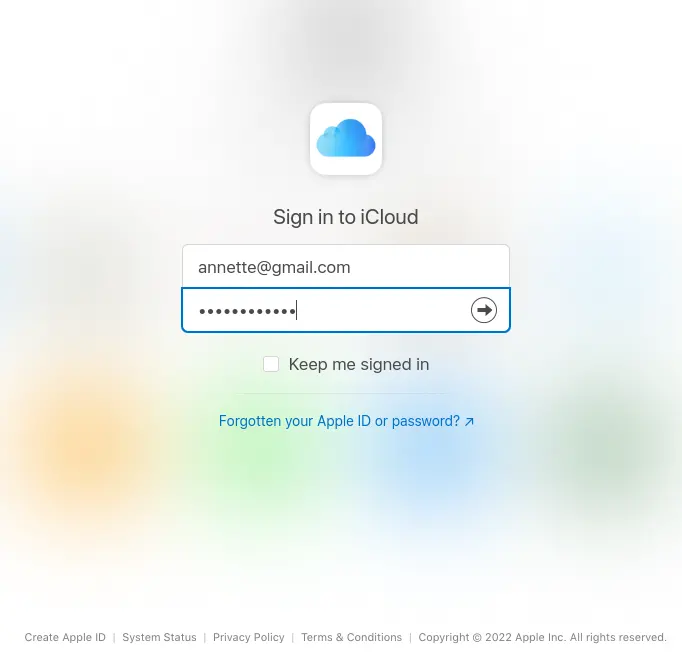
- The first step is to set up Apple Pay. For that purpose, you need a device that has a Wallet app and runs an up-to-date version of iOS. If your device has a built-in Touch ID or Face ID option, you will be able to use Apple Pay in Safari and within iOS apps. Make sure you sign in to iCloud using your Apple ID.
- Players must register their credit or debit cards with Apple Pay. Keep in mind that the card you register must be issued by a participating bank. You can store 8 to 12 cards, depending on the iOS device you use.
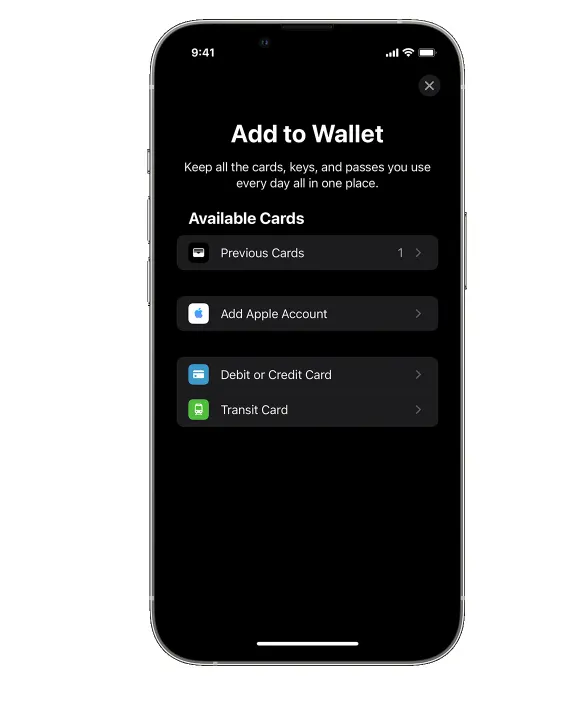
- Open the Wallet app and tap the plus sign in the upper-right corner to add a debit or credit card. Tap Debit or Credit card to add a new card. If you want to add a card that you have previously used, tap the Previous Cards button.
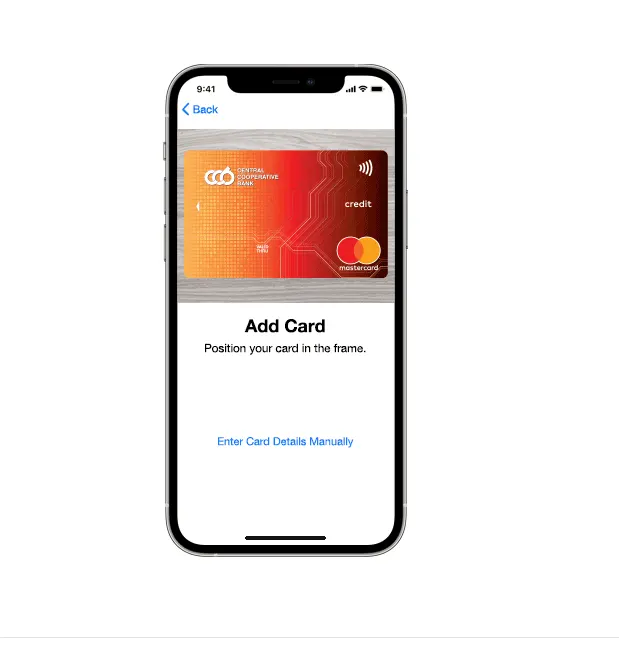
- Use your camera to scan your card. It is also possible to enter your banking details manually.
- Verify your information with your bank. You may be asked to provide additional details or download your bank’s app. The card issuer will notify you once the card is approved for Apple Pay.
Using Apple Pay on Mac, iPad, and Apple Watch
Players can use Apple Pay on paired devices such as Apple Watch. To add a debit or credit card to your Apple Watch, open the Apple Watch app and select the My Watch tab. Tap Wallet and select Apple Pay. Choose Add Card and follow the on-screen steps. You may be required to verify your information with the card issuer.
Players can also use Apple Pay in Safari on their Mac or iPad devices that have Touch ID or Face ID. Navigate to System Preferences and open Wallet & Apple Pay. Enable Allow Payments on Mac and tap Add Card.
If your Mac does not support Touch ID, you can still make online payments with Apple Pay. You will, however, need a compatible iPhone or Apple Watch to complete the transaction, and you must enable the Allow Payments on Mac feature.
What is Apple Cash?
 Apple Cash is a digital card that allows users to send, request, and receive money easily in the Wallet app or Messages app. It can be used to make online and in-person payments. Setting up your Apple Cash card is a hassle-free process. You just need to open the Wallet app, tap the Apple Cash Card button, and select Set Up Now. After that, navigate to Settings and go to Wallet & Apple Pay. Turn on your Apple Cash card, and voila, you can use it. Keep in mind that if you use Apple Cash to make purchases in stores, you may be required to enter a PIN to finalize the transaction. You can find your PIN in the Card Details menu.
You can use the debit or prepaid cards saved in your Wallet app to add funds to your Apple Cash card. If you use the Wallet app on your iOS device, you can fund your Apple Cash card by opening the Wallet app, selecting your Apple Cash card, tapping the More button, and choosing Add Money. Then enter the amount you wish to deposit to your Apple Cash card and select the card you prefer to use. Keep in mind that the minimum amount you can add to your Apple Cash card is $10. You will be required to approve the payment with Face ID, Touch ID, or passcode. If you have an account with a US bank, you can also transfer funds from the Apple Cash card to your bank account. The maximum amount one can transfer is $10,000 per transaction or $20,000 per week.
How to Use Apple Pay?
Using Apple Pay for Gambling Transactions
 In some ways, Apple Pay is similar to the service that e-wallets offer. This is an intermediary service which allows you to pay with your credit or debit cards but without exposing any of your card details. This instantly makes Apple Pay a very secure option when it comes to boosting your casino balance.
Before using this payment solution, you must save your credit or debit cards in the Wallet app on your device. This will help you set up your Apple Pay account and give you the opportunity to boost your casino balance instantly. Before saving your card on your Apple device, you must make sure that your card issuer supports Apple Pay. You should also be using a device that runs the latest version of iOS, watchOS, or macOS. If you use an iPhone or iPad, you can scan your card instead of entering its details manually when adding it to Wallet. After entering the card details, your request will be sent to your bank for approval. Once this is done, you are ready to use Apple Pay at online casinos.
In addition to credit and debit cards, US citizens can also set up an Apple Pay Cash card. They can upload funds to this card and use it for purchases online and offline. Thanks to this option, Apple users can also request and receive payments via the Messages app. The money that they get is transferred to their Apple Pay Cash card, and they can easily use their available funds to pay for various services and purchases.
When you are ready to make a deposit at an online casino, go to the Cashier and select Apple Pay from the list of payment options. Enter the amount you want to deposit and tap the Apple Pay button. Next, confirm the transaction with Touch ID or Face ID.
Touch ID requires you to press your device’s Home button with your finger to authenticate the payment. If you use an iPhone X or newer, you can instead use Face ID, which scans your face to verify the payment.
After confirmation, the money appears in your gaming account instantly. This is great news for players who do not like to wait and are eager to start wagering real money online.
Because you are not asked to provide card details or other sensitive information, Apple Pay is a very secure payment solution. Unfortunately, the service can be used only to top up your balance. You will need a different method to withdraw your winnings.
| Apple Pay Gambling Transactions | |
|---|---|
| Supported transactions | Deposits |
| Deposit pending time | Instant |
| Withdrawal pending time | N/A |
| Additional security | Players need to enter the passcode they have chosen |
Advantages and Disadvantages of Using Apple Pay as a Casino Payment Method
 Apple Pay offers plenty of perks for virtual players. Consider the following pros and cons to decide whether Apple Pay suits you.
Simplicity tops the list of perks this deposit method provides. Whether you are playing on your MacBook, iPhone, or iPad, you will be able to complete your casino deposit in just a few taps on the screen of your Apple device. The payment requires few steps, and authentication is just as easy.
The speed of transactions is yet another benefit of using Apple Pay for funding your casino balance. Whenever you initiate a deposit via Apple Pay, you will simply have to confirm the transaction via the Touch ID or Face ID function. Since this takes only a few seconds and you do not need to take any other steps, you can see your money in your casino account instantly. This allows you to fund your gaming balance and start making bets right away.
Security is another strong point. Apple Pay is designed to protect its users. Even though you are still using your credit or debit card to make payments online, you do not expose your card details to anyone. This gives you additional protection when you do not feel comfortable sharing sensitive information with online casinos. Because your card details are not stored on your Apple device, you do not have to worry about someone misusing your cards.
Players also consider whether a payment method charges extra fees. If you deposit via Apple Pay, virtual casinos typically impose no surcharges.
There are not many disadvantages to using Apple Pay at online casinos. That said, you may still struggle to find casinos that accept Apple Pay. The service is still relatively new in the online-casino world, but more gaming websites are starting to accept payments via Apple Pay.
A major disadvantage is that players can use Apple Pay only for deposits. Since the service does not support withdrawals, you will have to resort to a different payment method when you are eager to cash out your casino winnings.
Finally, accessibility is another drawback. If you are not an Apple user, you will not be able to use this payment service. Consequently, many casino members cannot top up their balances with Apple Pay. What is more, the service is not available worldwide, which may force some players to seek other payment methods.
| Apple Pay Pros | Apple Pay Cons |
|---|---|
| Easy to use | Not available for cashouts |
| Apple Pay does not charge any extra fees | It is accepted by a limited range of virtual casinos |
| Deposits are processed instantly | It can be used exclusively by players who have an iOS-run device |
| Better privacy | |
| Ensures high levels of security |
Fees for Gambling Transactions
 As mentioned earlier, one of the best things about Apple Pay is that it does not impose additional charges when you deposit money at an online casino. This is great news for virtual players, as casinos often charge processing fees depending on the chosen method. This, however, will not be the case when you use Apple Pay. However, if you use an Apple Pay Cash card, you may incur fees when funding the virtual debit card.
You can use the cards you have already saved in your Wallet app to upload money to the Apple Pay Cash card. If you decide to use a debit card to transfer money to your virtual card, you will be charged no fee. Whenever you decide to upload funds to your Apple Pay Cash card via a credit card, however, you will have to pay a fee of 3%. Despite this small fee, sending and receiving money via Apple Pay is free of charge.
Processing Time for Transactions via Apple Pay
 If you want a payment method that lets you play for real money right away, Apple Pay is a great choice. It is an extremely fast way to boost your gaming balance without added risk.
The reason deposits via Apple Pay are so time-efficient is the simplicity of the payment method. You will not waste time filling out transaction forms, providing card details, or entering passwords to log into online banking.
| Apple Pay Processing times | |
|---|---|
| Gambling deposit time | Instant |
| Gambling withdrawal time | N/A |
| Bank account deposit time | N/A |
| Bank account withdrawal time | N/A |
| Credit/debit card deposit time | Instant |
| Credit/debit card withdrawal time | N/A |
Mobile Payments
 Not only can you use Apple Pay while playing on a mobile device, but you can also use it directly in apps. Whether you use the Safari browser or the dedicated casino app, you can make Apple Pay deposits with just a few taps.
The process is the same as on the desktop version of the casino. When you deposit at a mobile casino, you again use the credit or debit cards saved in Wallet. Apple Pay was designed with mobile payments in mind.
Thanks to the Touch ID and Face ID features, you will be able to finish any transaction on your iPhone or iPad in a few seconds. In addition, the process is secure, so you can play on the go with confidence.
Best of all, you do not need to download any extra app to use Apple Pay. It is built into most Apple devices and allows quick, hassle-free payments.
If you are playing at a mobile casino app, you can simply go to the cashier section and select Apple Pay as your preferred deposit method. After entering the amount you want to deposit, you may be asked to double-tap the side button if you use a newer iPhone. This action activates Face ID, and your money is transferred instantly via Apple Pay. Users with Touch ID simply rest a finger on the Home button to confirm the transaction.
The simplicity of the method proves that Apple Pay is excellent not only for in-store payments but also for making quick transactions in mobile apps and at various websites. This is great news for gambling fans who enjoy playing on the go.
| Apple Pay Mobile Payments | |
|---|---|
| Apple Pay | Yes |
| Google Pay | No |
Security at Online Casinos
 One of the main reasons why many players find Apple Pay very convenient is the security it provides. Using your credit or debit card directly at a virtual casino requires you to enter card details that are often saved by the website for future use. When you deposit via Apple Pay, you still use your card, but you do not expose any sensitive information. This helps you remain anonymous when depositing at your chosen online casino.
To verify transactions via Apple Pay, you must use the passcode you set up for the service. Most of the time, you will authenticate the deposit with Touch ID or Face ID. A strong passcode is harder to crack and increases payment safety. Alternatively, Touch ID and Face ID ensure that only you can authenticate payments on your Apple device.
Even though you are saving your credit/debit cards to your Wallet app in order to be able to use Apple Pay, you do not have to worry about someone taking advantage of your card details. This is due to the fact that this type of sensitive information will not be stored on your device, and even when you pay via Apple Pay, your details will not be shared with a third party.
To further improve the security levels of Apple Pay, the company uses encryption technology to protect the data that is shared during transactions. This gives you peace of mind whenever you are using Apple Pay for your casino funding.
| Apple Pay Security | |
|---|---|
| Passcode | Yes |
| Fingerprint | Yes |
| FaceID | Yes |
| Two-factor authentication | Yes |
| Trusted devices | Yes |
| IP Restrictions | Yes |