
Many casino fans are reluctant to disclose their banking details. In 2018, PayID was introduced to Australians as part of the New Payments Platform (NPP). The new service completely overhauled the online banking landscape across the country. The idea behind it is to provide Aussies with an easy-to-use payment solution that saves them the effort of remembering and disclosing their bank details.
PayID is a revolutionary payment service that allows users to rely on details they can easily recall to access their bank accounts. In fact, PayID is an identifier for your bank account. The money-transfer service is offered by Osko, and it is available to customers who have bank accounts at participating financial institutions. To process payments via PayID, you can use your phone number, email address, or ABN (Australian Business Number).
| PayID Summary | |
|---|---|
| Available in | Australia |
| Website | www.payid.com.au |
| Connecting bank account to PayID | Free |
| Withdrawal balance from PayID to your bank account | Free |
| Pay to online merchants | Free |
| Available for deposit | Yes |
| Available for withdrawal | Yes |
| Usual deposit time in online casino | Instant |
| Usual withdrawal time from online casino | Instant |
| Live chat | Depends on the bank |
| Telephone support | Bank-dependent |
| E-mail support | Depends on the individual financial institution |
PayID users can make online payments promptly and easily. Interestingly enough, the main idea behind this platform is to allow people to send money to others without the need to remember any bank details. Furthermore, PayID is the initiative of 13 of the most reputable banks in Australia and the Reserve Bank of Australia, meaning that it is safe to use. Before we continue, we would like to note that more than 100 banks offer the NPP and PayID to their clients.
Best PayID Casinos
-
Bizzo Casino
Min Deposit$10Max Withdrawal$4,000 daily, $16,000 weekly, and $50,000 monthlyDeposit Methods


























 Withdrawal Methods
 Withdrawal TimeInstant
- Customer support is available via live chat
- Live casino games
- Secured with SSL encryption
- Fully compatible with mobile devices
- Bizzo Casino offers a wide variety of games
- Fast verification process
Bizzo Casino is a modern online gaming website with clean graphic design. Its performance is also up to par, with snappy menus, and it is very easy to navigate the casino and locate your favorite games. When a game catches your eye and you decide to try it, you will land on an uncluttered page that delivers an immersive experience.
The casino’s catalog of titles is exceptional. A multitude of games is available, and players can enjoy releases from 100+ software providers. These include industry giants such as Microgaming, Playtech, Evolution Gaming, Ezugi, Betsoft Gaming, Rabcat, Play’n Go, and NetEnt, among many others.
None of the games at Bizzo Casino require additional downloads because the website is built on HTML5 technology. In addition, the library is not limited to desktop play. Bizzo Casino has an excellent mobile layout that is fully compatible with smartphones, ensuring that you can enjoy everything the casino offers wherever you have an internet connection.
-
National Casino
Min Deposit$10Max Withdrawaleton - €4,000, MuchBetter - €4,000, MiFinity - €2,500, MiFinity - €4,000, Luxon - €4,000, EcoPayz - €4,000, Skrill - €4,000, Neteller - €4,000, Interac - $4,000, Direct Debit - $3,000, iDebit - $4,000, InstaDebit - $4,000, Bitcoin - €4,000, Ethereum - €4,000, Bitcoin Cash - €4,000, LiteCoin - €4,000, Tether - €4,000, Ripple - €4,000, Cardano - €4,000, Dogecoin - €4,000, Bank Transfer - €2,500, eCashout - €4,000, PayID - €4,000Deposit Methods

 Withdrawal Methods
 Withdrawal TimeJeton - instant, MuchBetter - instant, MiFinity - instant, Luxon - instant, EcoPayz - instant, Skrill - instant, Neteller - instant, Interac - up to 3 days, Direct Debit - up to 3 days, iDebit - up to 3 days, InstaDebit - up to 3 days, Bitcoin - instant, Ethereum - instant, Bitcoin Cash - instant, LiteCoin - instant, Tether - instant, Ripple - instant, Cardano - instant, Dogecoin - instant, Bank Transfer - up to 3 days, eCashout - up to 3 days, PayID - instant
- Live table games
- The casino supports numerous withdrawal methods
- National Casino protects user data with SSL encryption
- User-friendly interface
- The website is available in English, Spanish, Greek, Japanese, French, and several other languages
- Fully compatible with mobile devices
National Casino delivers an outstanding player experience, offering a wide range of slots and online table games produced by leading software companies such as Kalamba, Playtech, Microgaming, and Yggdrasil. Fans of the classic brick-and-mortar atmosphere who cannot visit a land-based venue will be pleased to find a dedicated Live Dealers page. There, you can play blackjack, roulette, baccarat, and poker, all hosted by experienced croupiers who recreate the feel of a traditional casino from the comfort of your home.
If you decide to join National Casino, the registration process is streamlined and nearly effortless. In addition, your information will be verified quickly, allowing you to start playing and manage your winnings without delay. Should you need assistance, the site’s support team is ready to help. You can send an email or take advantage of the live chat function.
-
Hell Spin Casino
Min Deposit$10Max Withdrawal$4000 per day, $16,000 per week, $50,000 per monthDeposit Methods Withdrawal MethodsWithdrawal TimeUp to 3 days
- Varied withdrawal methods, including cryptocurrencies
- Customer support available via live chat
- Live dealer games
- Attractive and well-designed interface
- Protected with SSL encryption
- Fully compatible with smartphones
Hell Spin Casino features an impressive selection of games supplied by some of the industry’s biggest names. Players will find titles from Microgaming, Evoplay Entertainment, NetEnt, Play’n Go, and Playtech, among others.
Creating an account is straightforward. The registration process itself is very quick, and you can claim the new-player bonus directly from the sign-up menu, making your start at Hell Spin Casino even smoother. Verification is simple as well and is usually completed within 72 hours of submitting your documents.
Hell Spin does not offer a dedicated mobile app, but the same games are available on the go through the site’s mobile interface. Instead of installing additional software, simply load the Hell Spin website in your mobile browser and log in. Hell Spin Casino is optimized to work on all popular smartphone platforms, so both Android and iOS users can enjoy the casino’s catalog.
-
Woo Casino
Min Deposit$10/€20Max WithdrawalVisa - €4,000, Mastercard - €4,000, Skrill - €4,000, Neteller - €4,000, Neosurf - €4,000, ecoPayz - €4,000, PayID - €4,000, Paysafecard - €250, Interac - €4,000, Bank Transfer - €4,000, Bitcoin - 2 BTC, Ethereum - 5 ETH, Bitcoin Cash - 5 BCH, Dogecoin - 700,000 DOGE, Litecoin - 30 LTC, Tether - 4000 USDTDeposit Methods
 Withdrawal MethodsWithdrawal TimeVisa - 1-3 days, Mastercard - 1-3 days, Skrill - instant, Neteller - instant, Neosurf - instant, ecoPayz - instant, PayID - instant, Paysafecard - instant, Interac - 1-3 days, Bank Transfer - 1-5 days, Bitcoin - instant, Ethereum - instant, Bitcoin Cash - instant, Dogecoin - instant, Litecoin - Instant, Tether - instant
- Clean user interface
- Dedicated Android app
- Extensive selection of slots
- Account creation is quick and easy
- Wide variety of table games
- Plenty of withdrawal options
Woo Casino debuted in 2020 and offers plenty to gambling enthusiasts who enjoy playing online. Most of the titles at Woo Casino are slots, but that is far from the only form of entertainment. A live dealer section is also available, featuring classics such as blackjack, poker, baccarat, and roulette.
We were pleased to see that Woo Casino has ensured an excellent mobile gaming experience. Whether you love the portability of modern online casinos or simply do not have a desktop computer, you can play Woo Casino titles directly on your smartphone.
Players can take their favorite games on the go in multiple ways, starting with the mobile website itself. Load Woo Casino in your browser, and the site will automatically resize to fit your screen. Android users who prefer a standalone app are covered as well. Downloading the Woo Casino app is as easy as visiting the Google Play Store and installing it.
-
Stay Casino
Min Deposit$20Max Withdrawal- PayID - $4,000
- e-wallets - $4,000
- Online Banking - $4,000
- CoinsPaid - $4,000
- Bank Transfer - $4,000
- MiFinity - $1,000
Deposit Methods
 Withdrawal MethodsWithdrawal Time
- PayID - Instant
- e-wallets - Instant
- Online Banking - Instant
- CoinsPaid - Instant
- Bank Transfer - 3-5 days
- MiFinity - Instant
- Mobile-friendly
- Wide range of banking solutions
- Live dealer games
- Impressive slot library
- Support available via live chat
- Access to various responsible gambling tools
Established in 2021, Stay Casino is a promising iGaming site with plenty to offer, no matter what types of games you prefer. Slots are plentiful, and highlights include 1 Million Fortunes Megaways by Iron Dog Studio, NetEnt’s Starburst, and Book of Dead by Play’n GO. Reel enthusiasts can also enjoy bonus features such as free spins, stacked symbols, sticky wilds, respins, and gamble mini-games. Titles with a bonus buy option, such as Aztec Magic Bonanza, are available as well.
Live dealer games provide another avenue of entertainment. Blackjack, baccarat, roulette, Teen Patti, Andar Bahar, and Sic Bo are among the classics you can play with professional dealers at Stay Casino.
If you like gaming on the go, Stay Casino functions as an excellent mobile casino even without a standalone app. The site operates as a web application, which means you can open it in any mobile browser, including Safari, Chrome, or Firefox.
No installation is necessary, and the web app is compatible with Android and iOS devices. The slots run on HTML5, making them perfect for instant play, and the rest of Stay Casino’s catalog, including the live dealer tables, mini-games, and table games, is mobile-friendly as well.
-
Playamo Casino
Min Deposit$10Max WithdrawalVisa - $4,000, Mastercard - $4,000, PayID - $4,000, Skrill - $4,000, Neteller - $4,000, Neosurf - €4,000, ecoPayz - $4,000, Paysafecard - $250, Rapid - €4,000, MiFinity - $2,500, UPayCard - €4,000, SticPay - €3,000, AstroPay - $500, ZotaPay - $4,000, Interac - $4,000, Bank Transfer - €4,000, Bitcoin - 2 BTC, Ethereum - 5 ETH, Bitcoin Cash - 5 BCH, Dogecoin - 700,000 DOGE, Litecoin - 30 LTC, Tether - 4000 USDTDeposit Methods
 Withdrawal MethodsWithdrawal TimeVisa - 1-3 days, Mastercard - 1-3 days, PayID - instant, Skrill - instant, Neteller - instant, Neosurf - instant, ecoPayz - instant, Paysafecard - instant, Rapid - instant, MiFinity - instant, UPayCard - instant, SticPay - instant, AstroPay - instant, ZotaPay - instant, Interac- 1-3 days, Bank Transfer- 1-5 days, Bitcoin - instant, Ethereum - instant, Bitcoin Cash - instant, Dogecoin - instant, Litecoin - instant, Tether - instant
- Games from more than 60 software providers
- The website’s menus are well organized and easy to navigate
- Two-factor authentication
- 24/7 customer support
- Live dealer games
- SSL encryption
Playamo Casino serves an international audience, giving players plenty of choices when it comes to site language. Options include English, Italian, French, Japanese, German, and several others. Playamo users can also transact in various fiat currencies such as EUR, USD, AUD, and JPY, to name a few. Fans of blockchain payments have viable options as well, including Bitcoin and Ethereum.
Playamo Casino’s gaming library is remarkable, with dozens of slot titles alone in addition to live table games. Players will find releases from respected developers such as Mancala Gaming, Yggdrasil, and Evoplay Entertainment, among others.
Account security is a priority at Playamo. The site safeguards information with Secure Socket Layer encryption, and two-factor authentication (2FA) is available, too. This feature adds another layer of protection to the login process.
-
7Bit Casino
Min Deposit$10Max WithdrawalVisa - $4,000, Mastercard - $4,000, Maestro - $100, PayID - $4,000, Bitcoin - 0.001 BTC, Neosurf - $4,000, Litecoin - 0.015 LTC, Ethereum - 0.015 ETH, Dogecoin - 1000 DOGE, Bitcoin Cash - 0.003 BCH, Skrill - $4,000, Neteller - $4,000, Rapid Transfer - $4,000, ecoPayz - $4,000, Zimpler - $4,000, Interac - $4,000, Bank Transfer - $4,000Deposit MethodsWithdrawal MethodsWithdrawal TimeVisa - 1-3 days, Mastercard - 1-3 days, Maestro - 1-3 days, PayID - instant, Bitcoin - Instant, Neosurf - Instant, Litecoin - Instant, Ethereum - Instant, Dogecoin - Instant, Bitcoin Cash - Instant, Skrill - Instant, Neteller - Instant, Rapid Transfer - Instant, ecoPayz - Instant, Zimpler - Instant, Interac - 1-3 days, Bank Transfer - Instant- Streamlined verification process
- 24/7 customer support
- Deposit and wager limits available for 7Bit Casino clients
- The casino offers a vast game catalog
- Numerous withdrawal methods
- The website is available in English, French, Italian, Norwegian, Russian, Finnish, Japanese, German, and Czech
Slot enthusiasts will feel right at home at 7Bit Casino because the casino places a strong emphasis on slots. Notable titles include Temple of Dead by Evoplay, Blazing Bull 2 by Kalamba, Mancala’s Jewel Mania, and Booming Games’ Burning Classics. Beyond slots, players can also explore the casino’s live dealer offerings.
7Bit Casino further supports its users by providing a suite of responsible gambling tools that make managing money and playing time easier. One of the first options you can enable is a deposit limit, which lets you cap how much money you can add to your account.
You can also set a loss limit, based on the amount you have deposited, as well as daily, weekly, or monthly wager limits.
A session limit is available too, automatically logging you out once you exceed your allotted playtime. Finally, players can activate a cooling-off period, during which they cannot deposit or play and will not receive promotional messages via SMS or email.
-
Casinochan
Min DepositA$15Max WithdrawalVisa - A$6,000, Mastercard- €4,000, Paysafecard - €250, Skrill - €4,000, Neteller- €4,000, ecoPayz - €4,000, Neosurf - A$6,000, iDebit - $4,000, Instadebit - $4,000, Bank Transfer - €4,000, PayID - $4,000, Bitcoin - 2 BTC, Ethereum - 5 ETH, Bitcoin Cash - 5 BCH, Dogecoin - 700,000 DOGE, Litecoin - 30 LTC, Tether - 4000 USDTDeposit MethodsWithdrawal MethodsWithdrawal TimeVisa - 1-3 days, Mastercard - 1-3 days, Paysafecard - instant, Skrill - instant, Neteller - instant, ecoPayz - instant, Neosurf - instant, iDebit - instant, Instadebit - instant, Bank Transfer - 1-5 days, PayID - instant, Bitcoin - instant, Ethereum - instant, Bitcoin Cash - instant, Dogecoin - instant, Litecoin - instant, Tether - instant- Numerous withdrawal options
- Two-factor authentication available for Casinochan users
- Simple registration process
- Games from more than 50 software developers
- The casino is available in multiple languages: English, French, German, Italian, and Czech
- Fast verification process
Casinochan focuses mainly on slot games, but it also offers table classics such as blackjack and roulette. The list of software providers is extensive and includes Betsoft Gaming, Kalamba, Yggdrasil, Mancala Gaming, and Evoplay Entertainment, among others.
Security is a priority at Casinochan. The site protects user data with Secure Socket Layer encryption, and a two-factor authentication feature adds an extra layer of protection each time you log in. Even if someone obtains your credentials, they would still need the second verification step to access your account.
Reliable customer support is essential in the online gambling world, and Casinochan rises to the occasion. Users can contact the customer service team 24/7, and email is not the only communication channel. Live chat is available as well.
-
Casino Rocket
Min DepositA$15Max WithdrawalBank Transfer - A$6000, Interac - $2,500 - A$6000, Bitcoin - A$6000, Bitcoin Cash - A$6000, Litecoin - A$6000, Ethereum - A$6000, Ripple - A$6000, Dogecoin - A$6000, Tether - A$6000, MiFinity - $2000, ecoPayz- A$6000, PayID - A$6000Deposit MethodsWithdrawal MethodsWithdrawal TimeBank Transfer - 3-10 days, Interac - instant, Bitcoin - instant, Bitcoin Cash - instant, Litecoin - instant, Ethereum - instant, Ripple - instant, Dogecoin - instant, Tether - instant, MiFinity - instant, ecoPayz - instant, PayID - instant- The casino protects user data with SSL encryption
- Customer support available through live chat
- Compatible with iOS and Android phones
- Fun, well-functioning layout
- Ample withdrawal options
- Live dealer games available
Casino Rocket appeals to a wide range of gambling enthusiasts. While the majority of its library is made up of slot games, the casino also hosts an impressive collection of table games, both virtual and live dealer games hosted by professional croupiers. Prospective players can register quickly, as the process has been streamlined, and identity verification also takes little time.
A hallmark of any modern casino is mobile accessibility, and Casino Rocket is fully compatible with smartphones. When you access the site in a mobile browser, it automatically switches to a compact layout for effortless play on smaller screens.
For those who want extra control, Casino Rocket provides responsible gambling tools. You can enable a cooling-off period that blocks deposits and gameplay until the period ends, set alerts and notifications for playing time, or, in extreme cases, opt for self-exclusion.
-
Casinonic
Min DepositA$30Max WithdrawalA$4,000Deposit Methods Withdrawal MethodsWithdrawal TimeBitcoin - instant, Ethereum - instant, Tether - instant, Bank Transfer - 3-10 days, PayID - instant
- Responsible gambling tools
- SSL encryption
- Wide array of slot games
- Casinonic accepts cryptocurrency payment methods
- Quick account creation
- Multiple language options, including English, Finnish, Japanese, Italian, Polish, and Hungarian
Slot fans will appreciate the selection at Casinonic. The casino offers interesting and unique titles such as Bank Robbers by Belatra Games, Tree of Life by Evoplay Entertainment, Big Wild Buffalo by Belatra Games, Yggdrasil’s Casino Cosmos, and many others. Major providers like Microgaming and Play’n Go also feature prominently on the site.
Busy players will be pleased to know that the slot games mentioned above, along with numerous table games, are also playable on smartphones. The website automatically adjusts to a mobile-friendly layout whenever you access it on a handset. Because Casinonic is optimized for mobile browsers, both Android and iOS users can enjoy the full experience.
Customer support is not limited to desktop either. If any issues arise, the service team is available via live chat or email.










PayID Registration Process
As established, PayID is a form of payment that allows you to use your phone number, email address, or ABN (Australian Business Number) to send money. This banking solution requires an account with an Australian financial institution, as PayID must be activated through your bank. Below you will find the steps you need to take to start using this payment solution:
- Go to the official PayID website

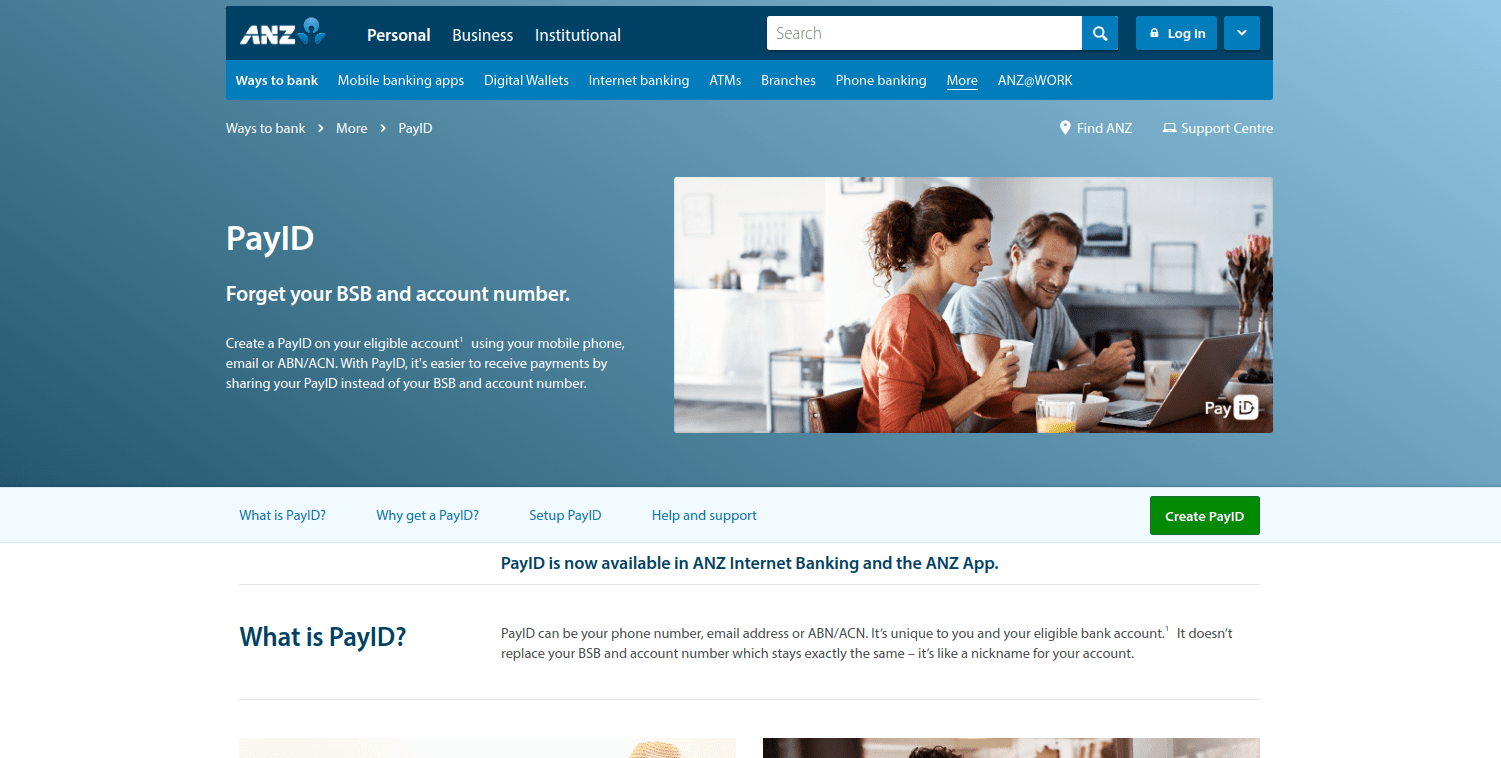
- Find a participating bank. PayID’s website lists all banking institutions that support the service. You can use the search bar to find a suitable bank or examine the list of participating banks on PayID’s home page.

- Once you have found a bank you can utilize, click on its logo. This will take you to the PayID page of that bank’s website.
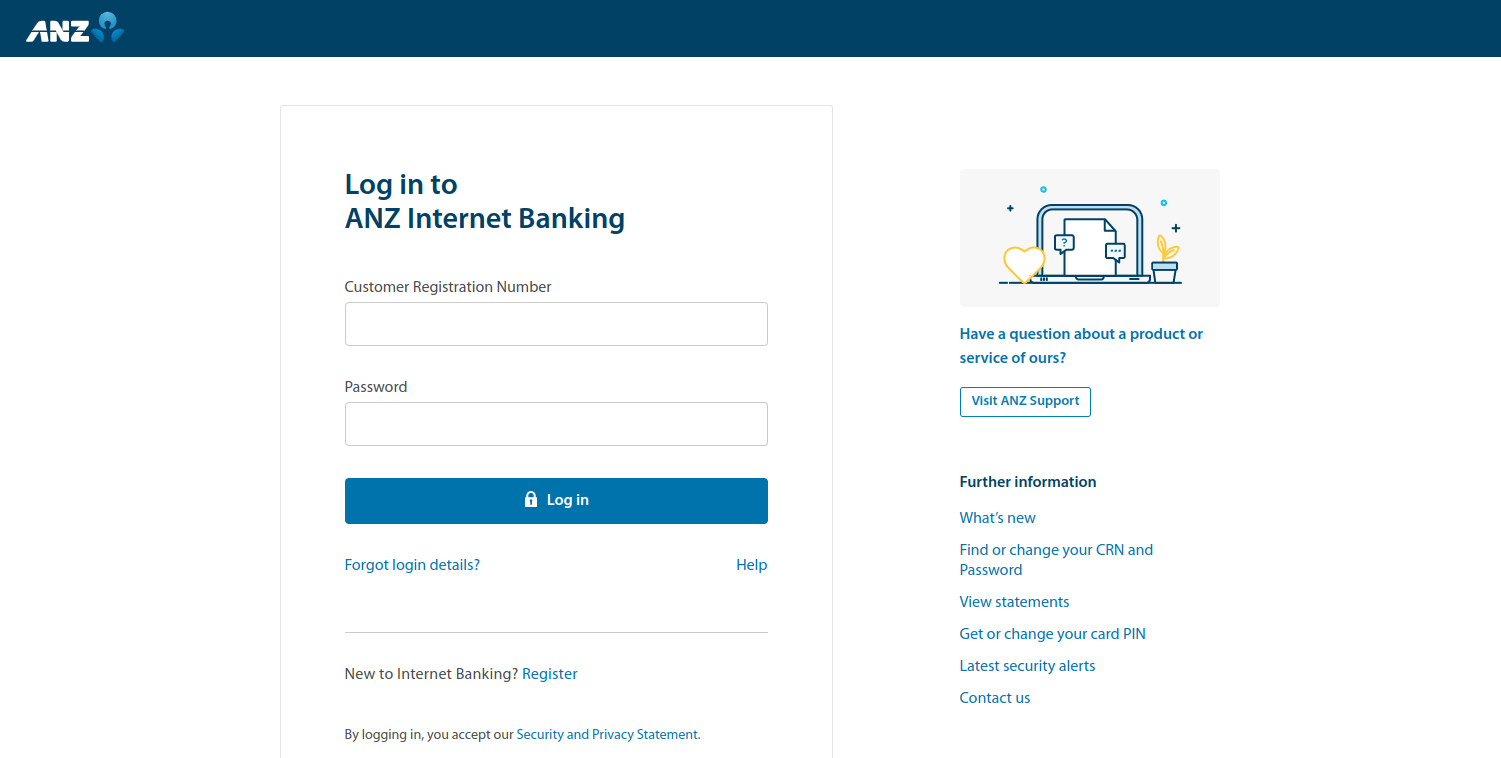
- Next, log in to your bank account by entering the required information.
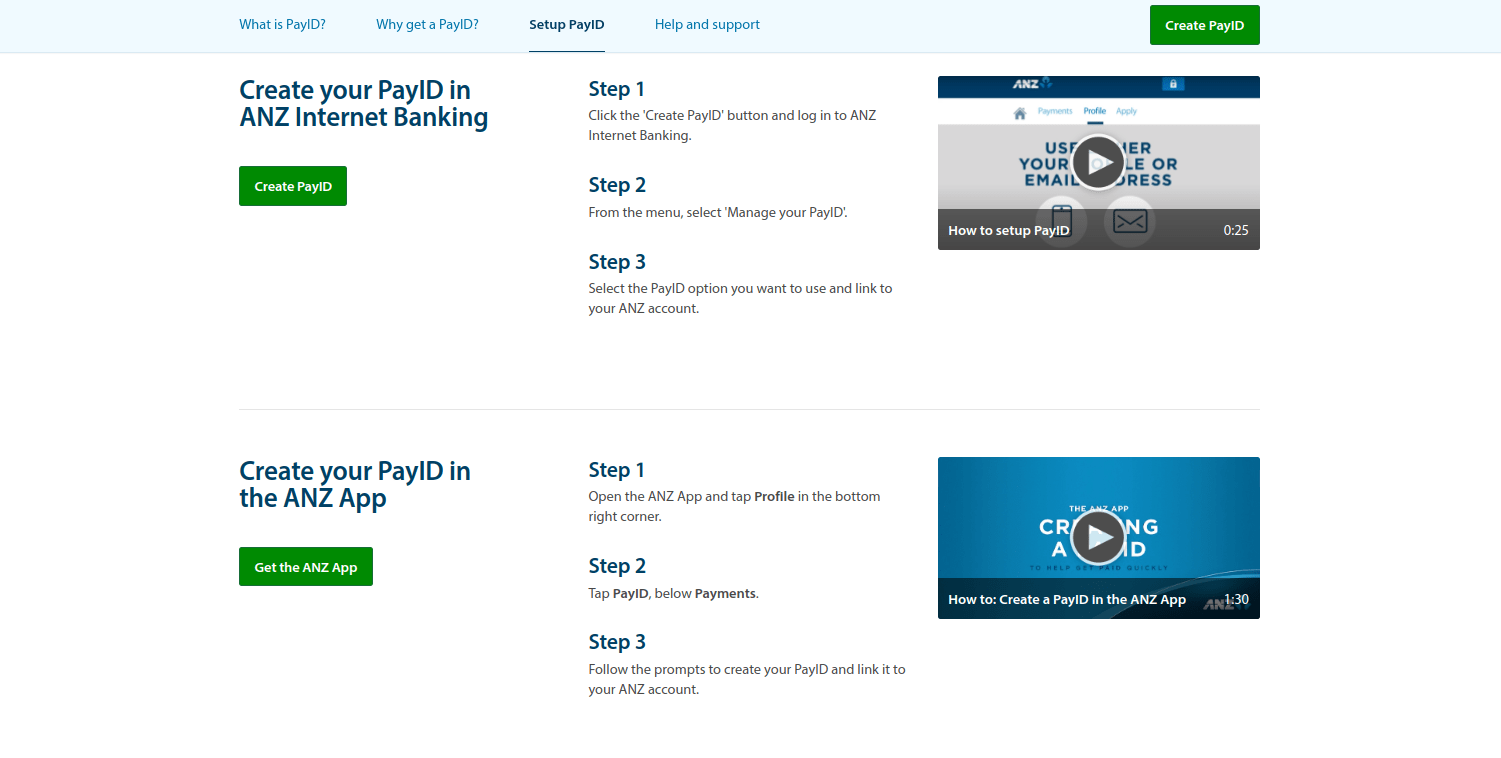
- Finally, follow the bank’s instructions and connect your account to your PayID.
Finalizing Bank PayID Registration
The process will not take long. PayID has ensured that future users can quickly find a banking institution that offers this service. Additionally, activating PayID after you reach your bank’s website is easy and fast, regardless of which institution you use for online banking.
At the time of writing, Australia has what is known as “the big four” banks: the Commonwealth Bank of Australia, Westpac (WBC), the Australian & New Zealand Banking Group (ANZ), and the National Australia Bank. All of these institutions enable their users to connect their accounts to PayID. Other popular banks that support PayID include Macquarie Bank and Bendigo Bank.
Using PayID for Gambling Transactions
 A growing number of online casinos geared toward the Australian market have started to embrace PayID. One of the reasons for this trend is that the payment service supports both deposits and withdrawals. Casino enthusiasts who are interested in using this method to make casino payments should first create their unique PayID.
To do so, you must have a bank account at a financial institution that offers this service. To use PayID, log in to your online banking account, click on the Payment Settings button, select “PayID,” and follow the instructions. After that, you will receive a code to verify your mobile number or email address.
If you use the CommBank app, log in to your account, click on the “Profile” button, and select “Manage PayID.” Then choose the type of PayID you would like to use and select an account that will be linked to it. Currently, there are four types of PayID: phone number, email address, ABN, and organizational ID.
The last step is to confirm your details by entering the code you receive. Once you successfully activate the PayID service, you will receive an email. From that point, your PayID is connected to your bank account. A single bank account may have multiple PayIDs; however, each PayID can be linked to only one bank account.
PayID for Gambling Additional TipsTo upload funds to your gaming account via PayID, log in to your online banking account, click on the “Pay someone” button, and enter the amount you wish to deposit. You will be required to fill in a description field of up to 280 characters and confirm the payment. If you have already deposited at a given online casino via PayID, the deposit will be processed instantly. For security reasons, first-time deposits at a gambling site might take up to 24 hours.
Another important thing to mention is that deposits and withdrawals via PayID are carried out in real time. If you are unsure whether you are sending money to the right person, you will see the name of the recipient before confirming the payment.
Once you have accumulated the minimum amount required by the casino for a withdrawal, you can use your PayID. Web-based casinos often have a pending period of 24 to 72 hours. After the casino operator releases your winnings, you will see them in your PayID instantly. In rare cases, it might take several hours for the money to reach your PayID account. Players should note that they will have to disclose their PayID to the casino operator.
Casino enthusiasts should keep in mind that not all web-based casinos that accept Australian players support PayID. Hence, if you wish to use this payment solution, we advise you to first visit the banking page of the casino before setting up an account.
| PayID Gambling Transactions | |
|---|---|
| Supported transactions | Deposits and withdrawals |
| Deposit pending time | Instant |
| Withdrawal pending time | Varies between casinos |
| Additional security | PayID users have to first log into their online bank accounts |
Advantages and Disadvantages of PayID
 Some casino fans are uncomfortable with sharing their bank details and personal financial information. That is why many Australian casino aficionados have started using PayID, as it comes with many advantages over traditional payment methods.
As we already explained above, PayID works as an identifier for your bank account. Hence, you do not have to remember or disclose your BSB or account numbers. In other words, PayID users can conveniently send and receive money. The fact that you do not need to share your bank details significantly increases safety and helps maintain your online anonymity.
Furthermore, the PayID platform meets all security standards employed by participating banks. This means that payments to and from online casinos are processed safely. As far as legitimacy goes, many well-established Australian banks have adopted PayID. In addition, the platform was launched by Osko as part of its New Payments Platform (NPP). Osko is a BPAY payment service that uses your bank’s security standards.
More Advantages and Disadvantages of PayIDMany casino fans choose their payment solution based on speed. After all, once you make a deposit to an online casino, you will most likely want to start playing right away. Using PayID means you can deposit at web-based casinos instantly.
Of course, receiving your winnings promptly is also important. Each virtual casino has its own rules and policies regarding payments. Some operators review payout requests within several hours, while others might take up to five business days. After the casino approves your request, the money will reach your PayID account almost instantly.
Probably one of the most notable advantages associated with PayID is the lack of fees. Linked to your bank account, the platform simply serves as an intermediary between consumers and merchants. PayID reduces the possibility of sending money to the wrong recipient, as you will see the name behind the email address or phone number before approving the payment.
Unfortunately, PayID can be used only for payments within Australia. Another drawback is that it is not available at every Australian-based casino. Therefore, fans who would like to use it for deposits and withdrawals have to do some research first.
Aussie players who decide to use PayID should know that they cannot withdraw their winnings directly from PayID. Once the money appears in your PayID account, you must transfer it to your bank account before you can use it.
On a positive note, PayID features generous daily limits that reach up to $10,000. However, casino enthusiasts should not exceed the payment limits imposed by the online casino they are playing at. All in all, PayID is an innovative payment service that offers numerous advantages tailored to the needs of Aussie casino fans.
| PayID Pros | PayID Cons |
|---|---|
| Deposits and withdrawals are processed safely and promptly | Only Australian residents can make use of PayID |
| No need to disclose bank details | PayID cannot be used for withdrawing money from an account |
| Using PayID is absolutely free |
Fees for Gambling Transactions with PayID
 At the moment of writing, there are no fees associated with the use of PayID. This means that casino enthusiasts will not be charged high fees for making deposits at online casinos or withdrawing funds. However, the payment platform is linked to the user’s bank account. Your bank might impose fees for transactions to and from your PayID account, but we cannot provide in-depth details, as these vary greatly between banks.
If you use PayID services via your CommBank account, you should know that the maintenance fee is $4 per month. However, if you make deposits totaling $2,000 monthly, you will not be required to pay a maintenance fee. Another important point is that the CommBank app imposes a daily withdrawal limit of up to $2,000. If you withdraw at non-CommBank ATMs, a fee might apply.
| PayID Fees | |
|---|---|
| Gambling deposit fee | Free |
| Gambling withdrawal fee | Free |
| Bank account deposit fee | Free |
| Bank account withdrawal fee | Free |
| Credit/debit card deposit fee | N/A |
| Credit/debit card withdrawal fee | N/A |
| Maintenance fee | Free |
Processing Times with PayID
 All financial transactions via PayID are processed in “near real time.” You can send and receive money within a minute. If you are a casino fan who wants to make a deposit at an online casino, the money will appear in your gaming account instantly.
Every seasoned casino fan knows that withdrawal processing times vary between casinos and payment methods. While deposits are processed immediately, withdrawals require more patience. Once you have accumulated sufficient winnings, you can request a withdrawal by visiting the casino’s cashier page. Remember that most online casinos have minimum and maximum withdrawal limits.
The web-based casino will take some time to process your withdrawal request. This period, known as the pending period, varies between casinos. Usually, PayID casinos process withdrawal requests within three business days. After approval, you will receive your winnings instantly.
| PayID Processing times | |
|---|---|
| Gambling deposit time | Instant |
| Gambling withdrawal time | Instant after the payment is approved by the casino |
| Bank account deposit time | Instant |
| Bank account withdrawal time | Instant |
| Credit/debit card deposit time | N/A |
| Credit/debit card withdrawal time | N/A |
Mobile Payments via PayID
 The PayID service is available to CommBank app users. Currently, over five million Australians use the app. Provided that your device runs on Android 4.4 or later, you can download the app from Google Play. The size of the app is 49 MB. If you own an iOS device, visit the Apple Store to find the CommBank app; it requires iOS 12.0 or later.
Both apps are available only in English, and you can download them for free. Installing them is a straightforward process that takes just a few minutes. Users can withdraw up to $500 from a CommBank ATM using Cardless Cash. To better control your finances, the apps come with useful features such as Goal Tracker and Spend Tracker. If you tend to forget bill due dates, you can opt to receive reminders and notifications.
Android users can also benefit from a feature called Tap & Pay, which allows on-the-go payments without cash or bank cards. For purchases under $100, no PIN is required. The CommBank app also allows users to use Google Pay and Apple Pay.
| PayID Mobile Payments | |
|---|---|
| Apple pay | Yes |
| Google pay | Yes |
Security at PayID Online Casinos
 With PayID casinos, you can make deposits and withdraw your winnings simply by entering your email or phone number. Hence, your financial information remains private. What is more, PayID payments are subject to the bank’s fraud-screening procedures. PayID users can rest assured that the money they send will reach the right person, as they will see the name of the recipient before confirming the payment. CommBank provides a 100 percent security guarantee to its users.
You will be able to register a PayID by logging in to your online banking. If you use PayID via the CommBank app, you can enable two-factor authentication (2FA) to add an extra layer of protection. NetBank users can register for NetCode, a time-sensitive password.
PayID warns users that any emails asking them to disclose personal or banking information that appear to be from the payment platform are actually phishing emails. All financial transactions processed via Google Pay or Apple Pay are safe, as both contactless payment systems use encryption.
| PayID Security | |
|---|---|
| Passcode | No |
| Fingerprint | No |
| FaceID | No |
| Two-factor authentication | Yes |
| Trusted devices | No |
| IP Restrictions | No |